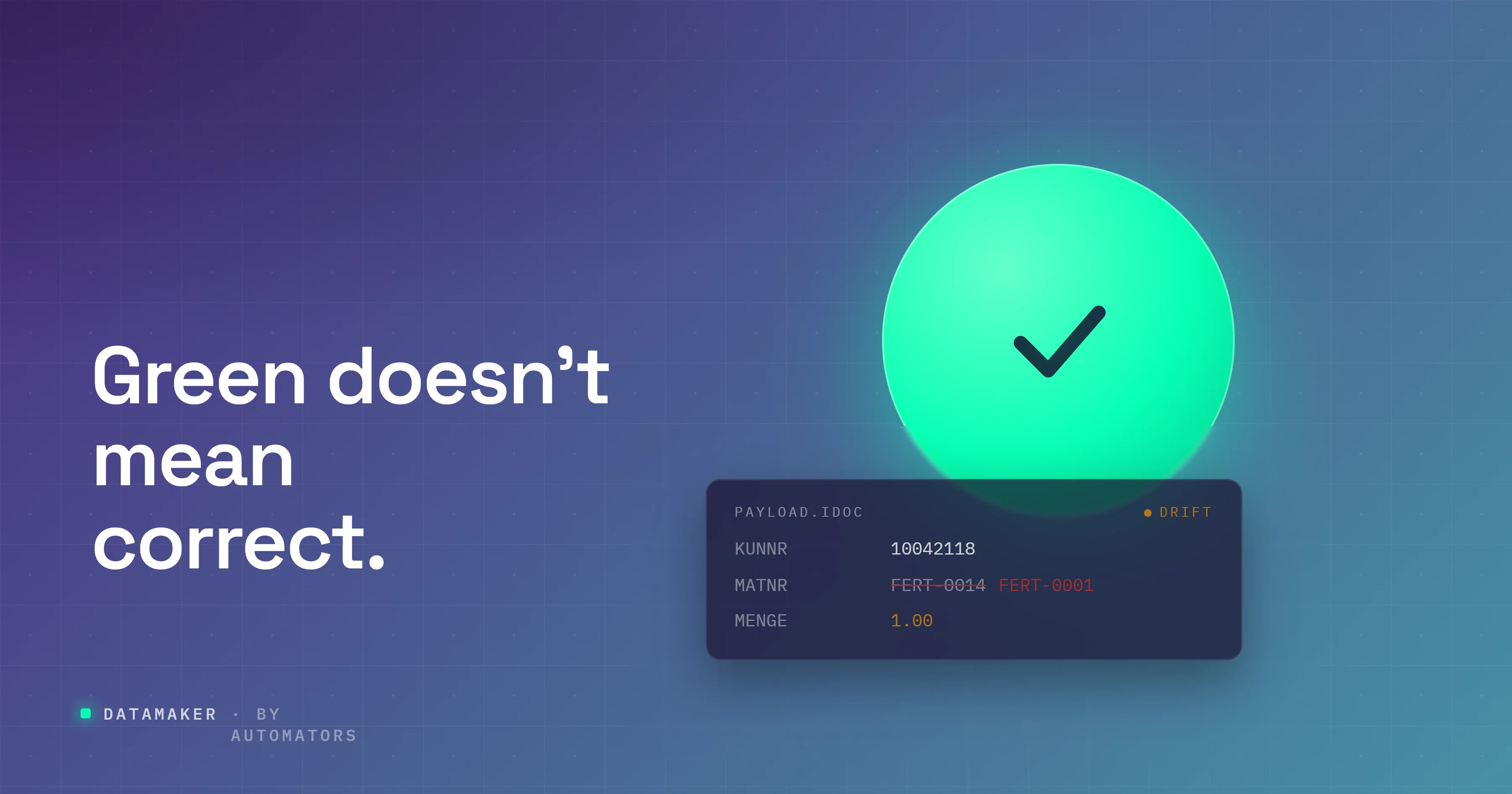
Imagine a screen in SAP showing a green status code: 53, "application document posted." Everything about it says success. The message left one system, arrived at another, and created a document on the far side.
Except that the price on that document is off by a decimal place.
This is the trap at the center of integration testing, and almost every beginner falls into it at least once.
The status code told the truth about one thing (the message arrived and posted) and said nothing at all about the thing that actually matters (whether the data is correct). A green light is a statement about delivery, not about accuracy. Learning to tell those two apart is most of what this discipline is.
If you're new to SAP and you keep hearing "integration testing" without anyone explaining what it actually involves or how you'd do it yourself, this guide starts from zero and stays honest about what you can and can't do on your own yet.
What Integration Testing Actually Checks
Integration testing confirms that separate systems, or separate modules, exchange data correctly when they work together.
The word carrying the weight in that sentence is between. You're not asking whether a system works on its own. You're asking what happens at the border, the moment data leaves one place and arrives somewhere else. Does it arrive at all? Does it arrive correct? Does the receiving side do the right thing with it?
This happens in two flavors. There's integration between SAP's own modules, like a sales order in SD triggering a stock movement in MM and a posting in FI. And there's integration between SAP and the outside world, like SAP sending an invoice to a customer's system or pulling employee records in from SuccessFactors. The second kind is where beginners get ambushed, because the other system has its own rules, its own data, and no obligation to be forgiving.
It helps to know where this sits among the other testing words people throw around, because they get used loosely and the overlap is confusing. Unit testing checks a single object, like one developer's custom function, in isolation. Functional testing checks that a business process behaves correctly inside SAP.
Regression testing re-runs after a change to confirm nothing that used to work has quietly broken. User Acceptance Testing is the business users confirming the system supports their real work before go-live. Integration testing is the one that lives in the gaps between systems.
If you've read the companion guide to functional testing in SAP, the clean line is this: functional testing proves the work is right where it's created, integration testing proves it survives the journey to wherever it goes next. You don't need to have read it to follow along here.
SAP Integration Mechanisms: IDocs, APIs, and Middleware
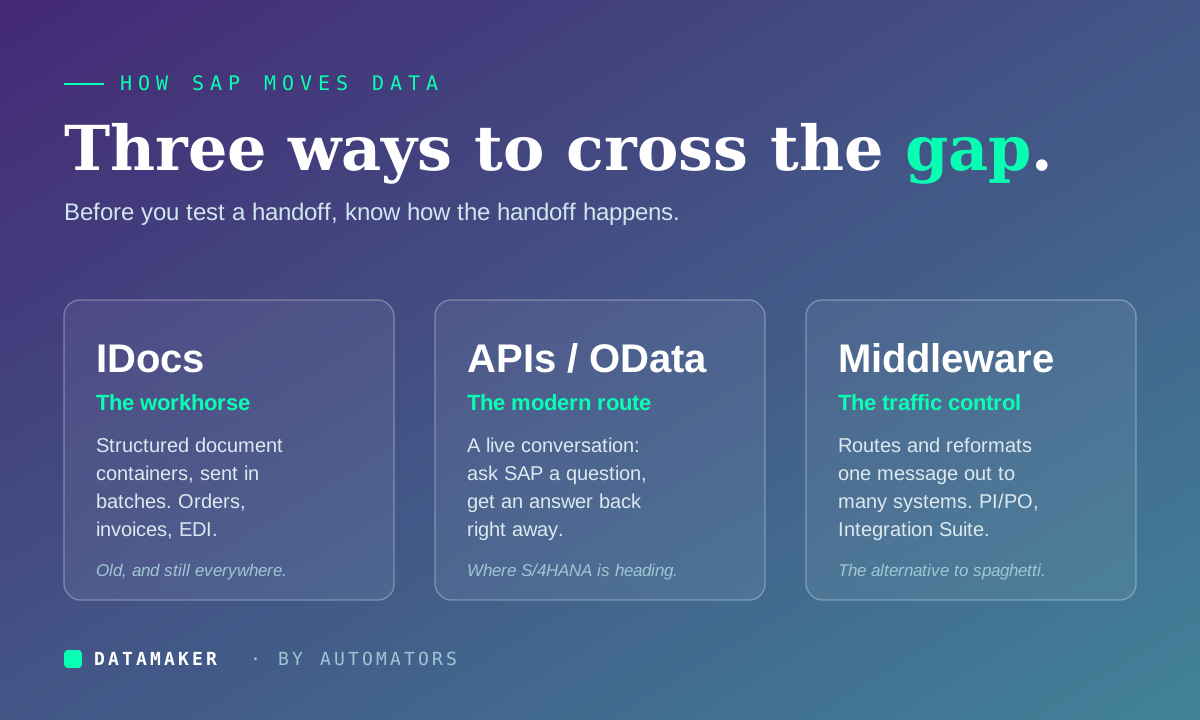
Before you can test a handoff, you need a rough picture of how SAP hands data off in the first place. There are three main mechanisms, and you'll bump into all of them.
IDocs Are The Workhorse:
An IDoc, short for Intermediate Document, is a structured container SAP uses to send and receive business documents like orders, invoices, and shipping notices. It's old technology that has outlived every prediction of its death and is still everywhere, especially in EDI exchanges with trading partners. Most of the hands-on testing you'll do early in your career touches IDocs, which is why this guide leans on them.
APIs, Including OData Services, Are the Modern Route:
Where an IDoc tends to move in batches, an API call is a live conversation: a system asks SAP a question and gets an answer back right away. This is the direction SAP is actively pushing. S/4HANA exposes a large catalog of OData and SOAP APIs through the SAP API Business Hub, and newer integrations lean on them heavily.
Middleware Sits in the Middle and Directs traffic:
SAP's middleware has worn several names: PI, then PO, and now the cloud-based SAP Integration Suite, often called CPI. Inside it you build iFlows, integration flows that define how a message gets routed, reformatted, and delivered.
One sales order might fan out through an iFlow to a CRM, a logistics provider, and a billing system, each wanting the data in a slightly different shape. Without middleware, every system has to wire directly to every other system, and that turns into spaghetti fast.
You don't need to master all three on day one. But when someone says "the IDoc is stuck" or "the iFlow didn't route," you'll know which leg of the journey they mean.
What You Can Actually Do on Your Own
Here's where most beginner guides start lying to you, so let me be straight instead.
A full integration test needs two systems that are already talking to each other, plus the plumbing between them. On a single practice system, with no configured partner on the other end, you cannot run that end-to-end test.
What you can do, and what genuinely builds the core skill, is learn to create, read, break, and reprocess an IDoc. That's a real, reproducible exercise, and it's the foundation everything else stands on.
Start by looking at IDocs that already exist. Open WE02 or WE05. Both display IDocs and their status records. Find one and read its status, the two-digit code that tells you exactly how far the document got. A handful come up constantly:
- 03: an outbound IDoc was passed to the port. Read that carefully, "passed to the port," not "received by anyone." More on why that matters below.
- 53: an inbound IDoc successfully created its application document on the receiving side.
- 51: an inbound IDoc failed to post. This is your error flag, and the status record usually tells you why.
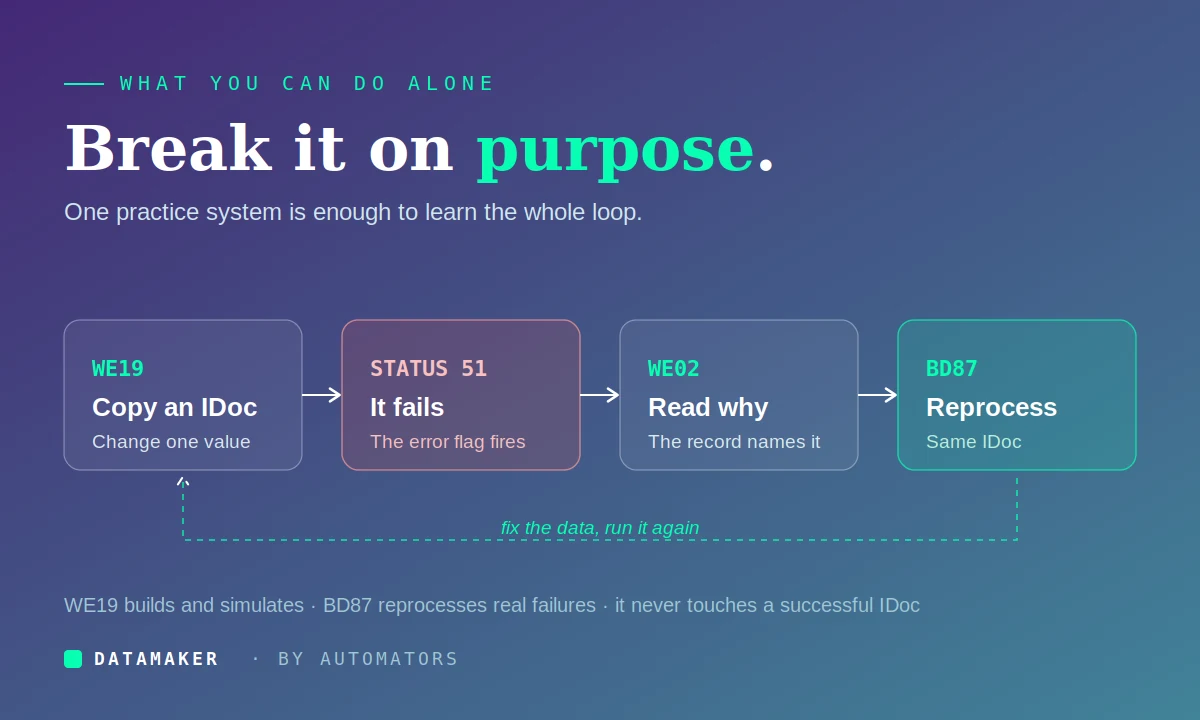
Now create one yourself. WE19 is SAP's IDoc test tool. It lets you build a test IDoc from scratch, from an IDoc type, or, most commonly, by copying an existing one and editing the fields. Copy a real IDoc, change a value, and run it through inbound processing to watch what happens.
One thing worth knowing up front so you don't confuse yourself: WE19 creates a new IDoc every time you process. It's for testing and debugging, not for fixing a real failed document.
That distinction leads to the other transaction you need. When an IDoc genuinely fails, you don't delete it and you don't reach for WE19. You use BD87, which reprocesses a failed IDoc while keeping its original number, and it only works on failed ones, it won't touch a successful IDoc. So the honest division of labor is: WE19 to simulate and experiment, BD87 to reprocess a real failure after you've fixed the cause.
The exercise that teaches you the most is deliberately breaking something. Copy an IDoc in WE19, change a material number to one the system doesn't recognize, process it, and watch it land in status 51. Read the status record to see the system tell you exactly what it choked on.
Then imagine you've fixed the underlying data and reprocess it. That loop, break it, read why, fix it, reprocess, is the actual daily work of integration testing in miniature, and you can do all of it on one practice system.
What a Real Integration Test Looks Like (and Why You Can't Fully Do it Alone Yet)
The exercise above teaches you the mechanics. A real integration test puts them in a landscape you probably don't have access to as a beginner, and I'd rather tell you that than pretend otherwise.
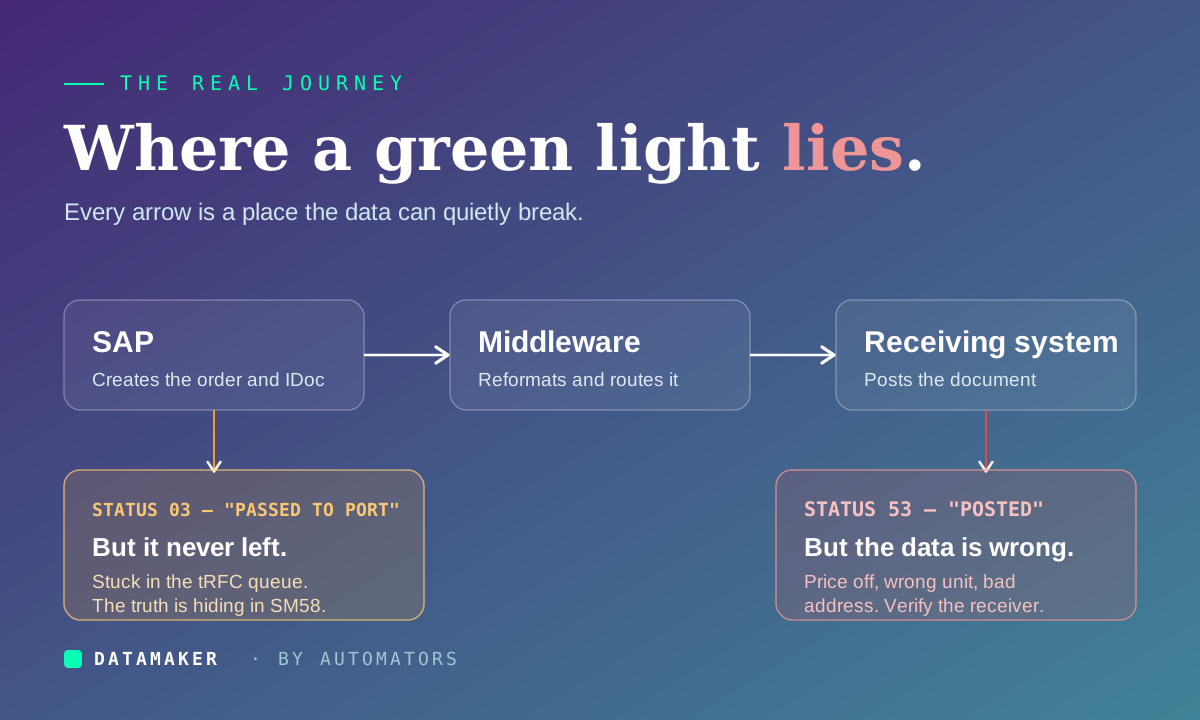
In a real test, SAP creates a sales order, that order generates an IDoc, the IDoc leaves through a port to middleware, the middleware reshapes it into the format a warehouse system expects, and the warehouse receives it and ideally sends back a confirmation.
Testing that means setting up matching configuration on both ends: partner profiles, ports, the receiving system's own master data, and a middleware flow that's actually running. That's a configured environment, not a sandbox, and standing it up is a project in itself.
The research-and-monitoring reality is the part worth carrying with you even before you have that environment. Remember status 03, "passed to the port"? Here's the catch that trips up even working consultants: an IDoc can show 03 in WE02 and still be sitting in the tRFC queue, never actually sent, because the receiving system was down or the connection failed. The IDoc monitor shows green while nothing left the building.
To see the truth you check SM58, the transactional RFC monitor, where the stuck call is waiting with its error. This is the perfect illustration of the whole discipline: one tool reports success while another, one layer down, shows the message never moved.
So the honest version of "how to run an integration test" is two-part. Learn the reproducible IDoc loop now, on whatever practice system you can get. Understand the shape of the full cross-system test so that when you do land in a configured environment, you already know where to look, and which monitors to distrust.
The One Habit That Matters Most
If you take a single thing from this entire guide, take this: never stop at the status code.
Status 53 means the document posted. It does not mean the document is right. A wrong price, a wrong unit of measure, a mismatched shipping address, all of them still produce a clean 53, because the status reports that the system accepted the message, not that the content is what you sent.
So go into the receiving system and look at the actual result. Did the order show the correct material, the correct quantity, the correct address? Did the price that landed match the price SAP sent?
A green light that nobody opened and verified is exactly how a company ends up confidently shipping the wrong goods while every monitor on the wall shows success. Make opening the receiver a reflex, not an optional final step.
The Mistakes That Break Integration Testing
These are the specific habits that quietly push broken interfaces into Production.
Trusting the code instead of the content:
It earns top billing because it's the most expensive one. A success status describes delivery, not correctness. Always open the receiving system and confirm the actual data.
Testing one direction only:
Plenty of integrations are two-way. If you confirm the outbound order leaves cleanly but never check that the inbound shipping confirmation comes back and posts, you've validated half an interface and shipped the rest on faith. The missing half tends to announce itself in Production.
Blaming the connection when it's the data:
When a test fails, beginners instinctively suspect the link between systems. Very often the link is fine and the real problem is that the two sides don't agree on a customer number, a material code, or a unit of measure. Mismatched master data is one of the most common causes of integration failure and one of the best disguised, because it looks like a connection problem.
Testing with data that's too tidy:
One clean material and one simple customer will sail through your test environment and then fall apart against Production data that's messy, multilingual, multi-currency, and full of edge cases. This is also where matching data across both systems gets genuinely hard: each side needs to recognize the same records, and a test environment rarely has that agreement by default.
You can't copy real master data across either, since privacy rules forbid moving sensitive records into test systems. Purpose-built test data generation tools exist to create realistic, matching, compliant data on both ends without lifting anything out of Production (ours, DataMaker, is one).
However you solve it, the principle holds: if the two systems don't truly agree on their data, your test is checking a fiction.
Looking at one transaction instead of the whole journey:
SAP's monitoring is spread across several tools, WE02 for the IDoc, SM58 for the communication layer underneath, and the Integration Suite cockpit for middleware flows. No single screen shows you the document's entire trip by default. If you only ever look at one, you only ever see one leg. Train yourself to follow a document from origin to final destination.
Where to go from here
If you're starting from nothing, here's an honest path.
Get fluent in IDoc statuses first. Open WE02 on any practice system and get to the point where 03, 51, and 53 mean something instantly and you know where each one sits in a document's life. This single skill makes you useful faster than anything else in integration testing.
Learn the three handoff mechanisms as a map, not a manual. Know roughly when a scenario uses an IDoc, when it uses an API, and where middleware sits between them. The mental picture matters far more than memorizing transaction codes you can always look up.
Get your hands on a practice system, because none of this sticks from reading alone. SAP's learning platform at learning.sap.com has free foundational material, and a demo system lets you actually create an IDoc, break it, and reprocess it.
And keep verifying the receiving end, every time. You already know why. What's worth adding here is that this one reflex is also what separates a tester people trust from one they double-check: anyone can report a green light, but the person who opens the target system and confirms the data is the one whose "it passed" actually means something.
That's the whole job, really. Integration testing isn't about the systems each working, it's about trusting the space between them, the handoffs where data is most likely to quietly go wrong and least likely to announce it.
Master the small reproducible loop, hold onto a healthy distrust of any single green screen, and you'll catch the failures that would otherwise wait politely until go-live to introduce themselves.