SAP systems rarely collapse because someone forgot to test a screen.
They struggle when real production behavior was never simulated.
A system may perform perfectly in QA with 20 users and limited data. Then, go-live week arrives. Month-end closing overlaps with heavy batch jobs. FI postings spike. Background jobs compete for work processes. Suddenly, response times jump from two seconds to fifteen.
That’s not a functional issue. That’s a performance planning issue.
SAP performance testing is about validating how your SAP landscape behaves under real operational load. Not just concurrent users clicking through transactions, but dialog work processes, background jobs, update tasks, HANA memory growth, and integration traffic happening at the same time.
In this guide, you’ll learn:
- How to design a SAP performance testing strategy based on real business behavior
- How to evaluate tools without blindly following vendor marketing
- What execution actually looks like inside SAP environments
- When internal teams can handle it and when external expertise becomes practical
This is not a tool brochure. It’s a practical guide for teams responsible for SAP stability.
How to Map a Strategy for SAP Performance Testing
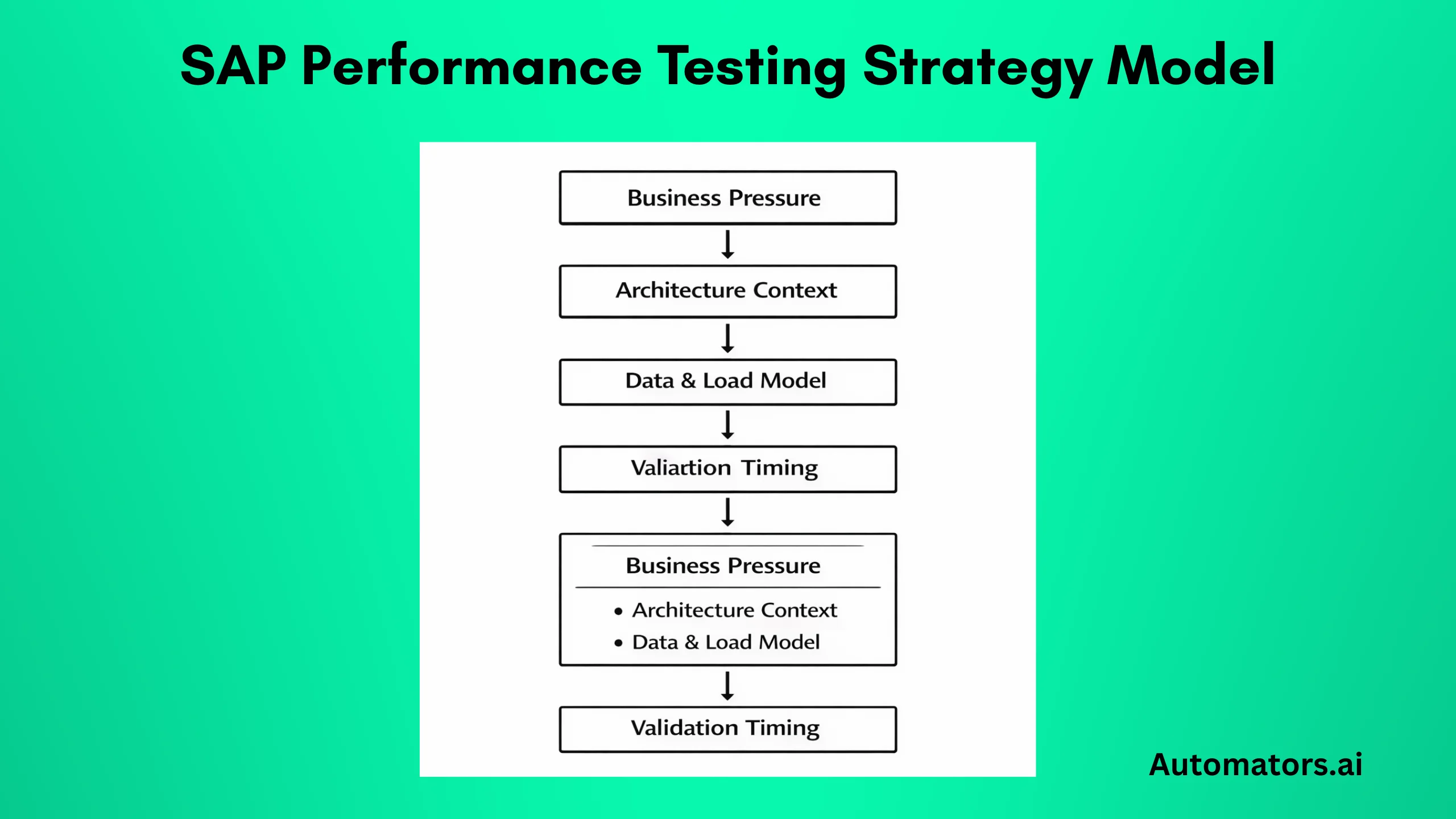
Before tools, before scripts, before dashboards, there’s one question:
What exactly are you protecting?
Performance testing in SAP should not begin with “how many users should we simulate?” It should begin with “Which business operations would hurt the most if response times double?”
1. Start with What Actually Matters to the Business
In SAP, different processes behave very differently under load.
Creating a sales order in VA01 is not the same as running MRP. Posting an FI document during daily operations is not the same as running mass financial postings during closing. Warehouse-heavy environments may stress MIGO and goods movements far more than SD-heavy landscapes.
Instead of listing generic “critical transactions,” look at:
- Peak posting windows during financial close
- High-volume batch jobs running at night
- Periodic spikes like payroll or inventory reconciliation
- Interfaces pushing thousands of IDocs within short timeframes
For example, many teams focus on dialog users but forget that background jobs often consume significant work processes. When month-end batch jobs overlap with active users, dialog queues grow, and response times deteriorate quickly.
A strong strategy maps performance testing directly to real operational pressure points, not theoretical ones.
Once you understand what matters to the business, the next step is understanding how your system is built to support it.
2. Understand Your SAP Landscape
SAP performance testing cannot be approached like testing a simple web platform.
Architecture changes everything.
If your system runs ECC on traditional databases, behavior differs significantly from S/4HANA on HANA.
In HANA-based systems, memory consumption patterns and expensive SQL statements often become the real bottleneck. Transaction ST03N may show high database time, while HANA expensive statements trace reveals inefficient CDS views or poorly optimized custom queries.
You also need to consider:
- Number of dialog and background work processes per application server
- Enqueue server capacity and potential lock contention
- Custom ABAP logic that loops over large internal tables
- RFC-heavy integrations that flood the system during peak hours
- Fiori applications making multiple OData calls per screen
If you ignore these layers and only simulate HTTP requests, you are not testing SAP realistically.
Performance strategy must align with how your specific SAP system is built and used.
But architecture alone is not enough. Even a perfectly sized system can behave unpredictably if the data and load assumptions are wrong.
3. Define Realistic Load and Data Models
Many performance tests pass because they are executed against unrealistic data volumes.
A system may handle 300 concurrent users smoothly when tables contain limited historical data. But once production carries years of transactional history, index scans and joins behave differently.
In SAP, data volume is often more impactful than user count.
Consider:
- How many records exist in BKPF or BSEG
- Whether archiving has been performed regularly
- Whether large custom tables have grown unchecked
- How many open documents exist during peak operations
For example, a pricing condition lookup in SD might respond instantly in QA but slow down in production because condition tables are significantly larger.
A realistic performance strategy should reflect:
- Production-like data size
- Peak transactional concurrency
- Batch job overlaps
- Integration spikes
Otherwise, performance testing becomes an academic exercise rather than a predictive one.
There is one more dimension that often gets overlooked: timing.
Even a well-designed load test loses value if it happens too late in the lifecycle.
4. Decide When Performance Testing Happens
Another common mistake is scheduling performance testing as a final checkpoint before go-live.
At that stage, infrastructure is fixed. Custom code is complete. Major design decisions are already locked.
If bottlenecks surface late, the only options are emergency tuning or hardware scaling.
A more stable approach integrates performance validation earlier:
- Validate custom developments for performance impact before transport to QA
- Run targeted load checks after major integration changes
- Monitor workload statistics continuously using ST03N and system logs
This does not mean running full-scale load tests every sprint. It means treating performance as an evolving metric rather than a last-minute validation step.
When performance testing evolves alongside your SAP landscape, issues are identified while they are still manageable.
Once strategy, architecture awareness, data realism, and timing are clear, only then does tool selection make sense.
How to Choose the Right Tool for SAP Performance Testing
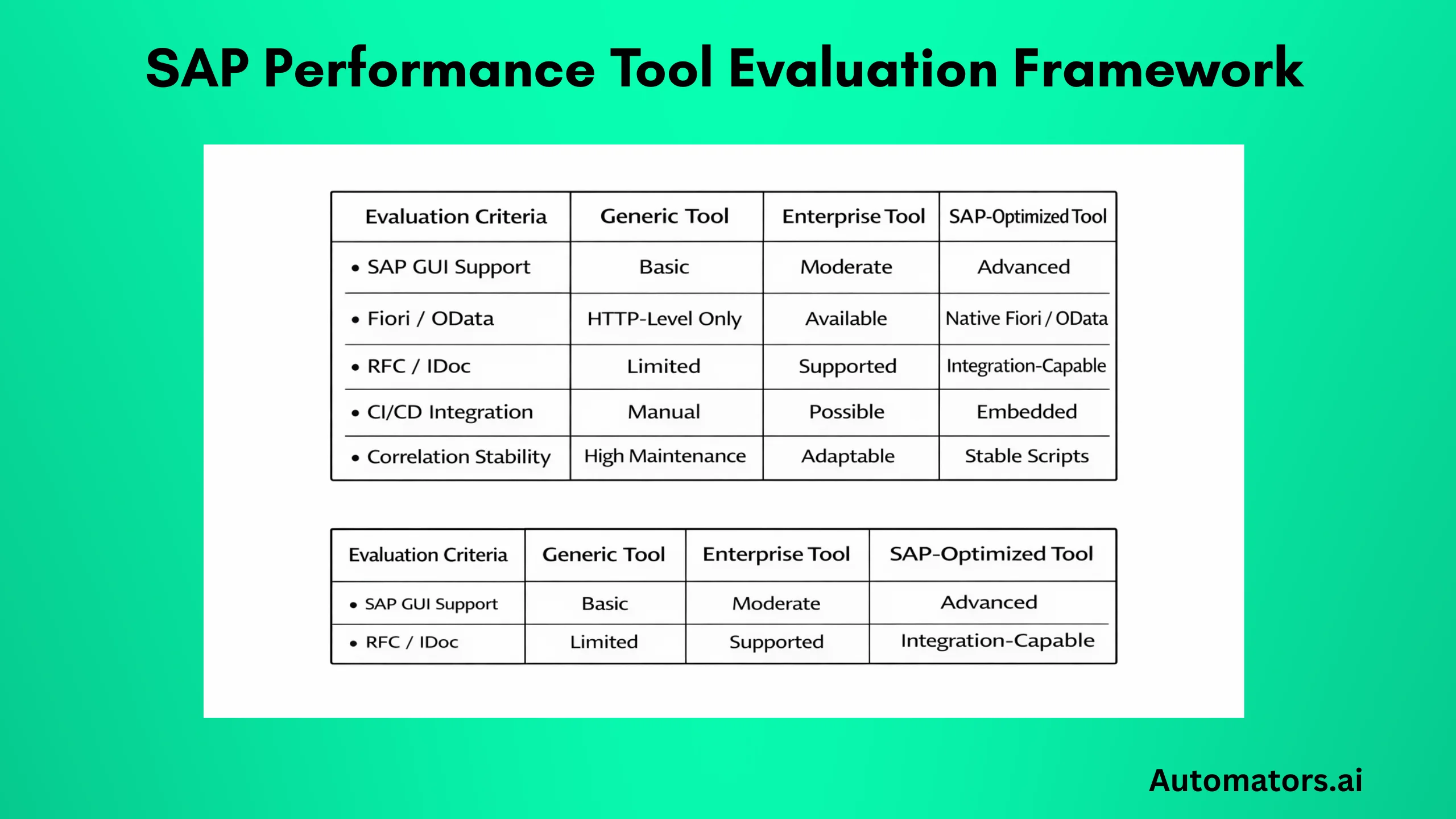
There is no single “best” performance testing tool for SAP. There is only the tool that matches your architecture, team capability, and delivery model.
The mistake many teams make is starting with a brand name instead of starting with technical requirements.
Before comparing tools, clarify a few practical realities:
- Are you primarily testing SAP GUI transactions?
- Are Fiori apps central to your user base?
- Do you need to simulate IDoc or RFC traffic?
- Are you running performance validation inside a CI/CD pipeline?
- How experienced is your team with correlation handling and script maintenance?
These questions matter more than vendor comparisons.
With those realities in mind, let’s look at what actually matters when evaluating a performance testing tool in a SAP environment.
What to Evaluate in Any SAP Performance Tool
When evaluating a tool for SAP performance testing, focus on how well it understands SAP behavior rather than just HTTP traffic.
For example:
If you are testing SAP GUI, does the tool support SAP GUI protocol recording reliably? Can it handle dynamic session IDs and correlation without excessive manual scripting? How stable are the scripts when transports modify screens or field logic?
If you are testing Fiori applications, does the tool properly simulate OData calls and handle authentication mechanisms used in your environment?
If your landscape includes heavy RFC or IDoc integration, can the tool simulate backend load beyond browser-level activity?
Also consider reporting depth.
Basic response time charts are not enough. You should be able to correlate response time with:
- Database time
- Application server utilization
- Work process saturation
- Memory consumption
Without this correlation, performance analysis becomes guesswork.
a. Apache JMeter
JMeter is often considered because it is open-source and widely known.
It works well for generic HTTP load testing and can simulate Fiori applications at the HTTP level. However, it does not have deep SAP-native protocol awareness.
Testing SAP GUI transactions with JMeter requires additional configuration and is rarely straightforward. Script maintenance can also become complex when dealing with dynamic SAP sessions.
For smaller environments or non-critical load checks, JMeter may be sufficient. For complex SAP landscapes, it often requires significant customization.
b. LoadRunner
LoadRunner has long been used in enterprise environments and provides SAP protocol support, including SAP GUI.
It is mature and capable of handling large-scale simulations. Many long-running SAP programs still rely on it, particularly in traditional on-premise environments.
However, integration into modern CI/CD pipelines may require additional effort depending on the setup.
c. Tricentis NeoLoad
Tricentis NeoLoad is frequently selected in SAP-centric enterprise programs, particularly when performance testing is part of a broader continuous testing strategy.
It provides strong SAP protocol support, including SAP GUI and web technologies. Script stability tends to be more manageable in SAP-heavy environments compared to purely HTTP-based tools.
One practical advantage is how it integrates with automated testing ecosystems and modern delivery pipelines. For organizations aligning functional and performance testing under a unified strategy, this can simplify governance and reporting.
Tool choice should always align with your architecture and internal expertise.
But even with the right tool in place, performance failures still happen. And that usually has little to do with software.
How to Avoid the Tool-First Mentality?
Performance issues in SAP are rarely caused by choosing the “wrong” tool.
They are caused by:
- Testing unrealistic scenarios
- Ignoring data volume
- Overlooking the background job impact
- Failing to analyze database time properly
A mature approach defines strategy first, then selects the tool that best supports it.
With strategy and tooling aligned, the real work begins: structured execution.
Execution Framework for SAP Performance Testing
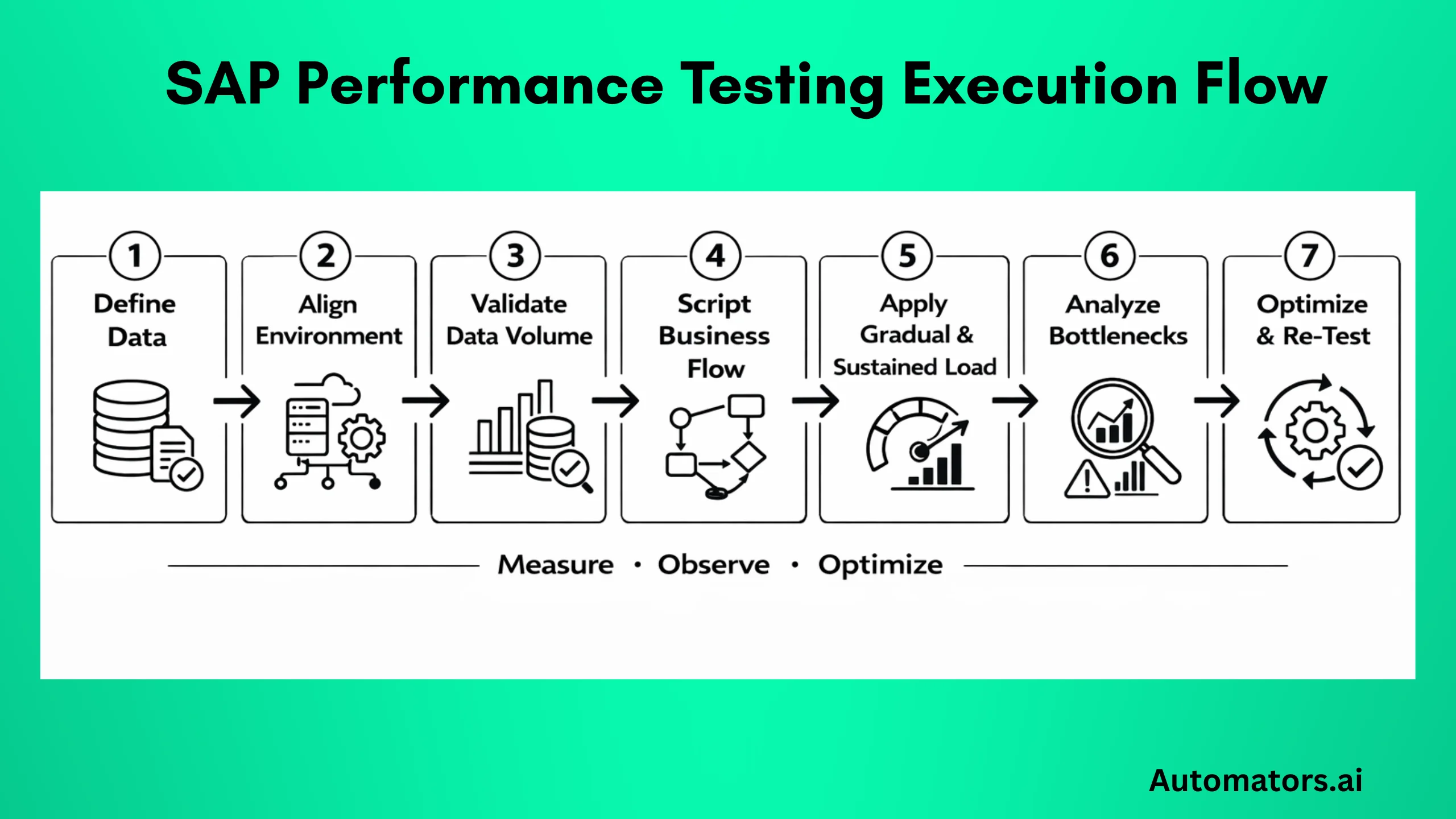
Once strategy and tooling are defined, execution needs discipline. Not just “run a load test and see what happens.”
In SAP environments, performance testing is not a single event. It is a controlled experiment where you observe how dialog processes, database time, memory, and integration traffic behave under defined stress conditions.
Below is a practical execution flow that reflects how SAP systems are actually analyzed.
Step 1 – Define Scope and Measurable KPIs
Before running anything, define what acceptable performance means in your system.
“Fast enough” is not a metric.
For example:
- VA01 order creation should complete within 3 seconds under 150 concurrent users.
- MIGO posting should not exceed 5 seconds during peak warehouse activity.
- Batch job runtime during month-end should remain under a defined threshold.
Also define system-level KPIs:
- Maximum dialog work process utilization
- Acceptable database time percentage in ST03N
- CPU thresholds on application servers
- HANA memory growth patterns during sustained load
If KPIs are unclear, performance testing becomes subjective.
Once KPIs are clearly defined, execution becomes measurable rather than subjective. The next priority is ensuring the environment reflects reality.
Step 2 – Prepare the Environment Properly
One of the biggest reasons performance testing fails to predict production behavior is environment mismatch.
Testing in a scaled-down QA system with fewer application servers and reduced background processes does not reflect production.
At minimum, validate:
- Number of dialogs and background work processes per app server
- Active background job schedules
- Interface connections (do not disable them unless necessary)
- HANA configuration parity
Also, check whether enqueue replication is configured similarly to production. Lock contention often appears only under realistic concurrency.
If the test environment is not representative, the results will not be either.
Step 3 – Validate Data Conditions Before Execution
Before load execution, inspect data.
Open ST03N and analyze workload history. Check table sizes in DBACOCKPIT. Review whether large transactional tables like BKPF, BSEG, VBAK, VBAP reflect production scale.
If your QA system contains only 10% of the production data volume, performance behavior will differ significantly.
For example:
A SELECT statement on a small table may use an index efficiently. The same statement on a large production table may trigger expensive scans.
HANA expensive statement trace is particularly useful during this validation phase.
Data realism is often the silent differentiator between predictive and misleading results. With data validated, scripting must reflect real operational behavior.
Step 4 – Script Real End-to-End Business Flows
Avoid testing isolated technical steps.
For example, testing only VA01 is incomplete if real operations involve:
- Order creation
- Credit check
- Availability check
- Pricing condition evaluation
- Delivery generation
These chained processes may touch multiple tables, custom logic, and integration points.
Also monitor how scripts behave when multiple users trigger transactions that compete for locks.
Lock objects and enqueue server behavior can significantly affect response time under concurrency.
If possible, validate script stability by running smaller pilot loads before full-scale execution. After scripts are validated, load patterns must reflect how users and systems actually behave over time.
Step 5 – Execute Gradual and Realistic Load Patterns
Do not immediately simulate peak load.
Start with baseline:
- Run a small number of concurrent users
- Measure response time
- Validate system stability
Then increase gradually.
Observe:
- Dialog queue growth
- Work process saturation in SM50 or SM66
- Database time percentage in ST03N
- HANA memory allocation patterns
Sustained load testing is also critical. Some issues appear only after 30–60 minutes of continuous activity when memory or temporary objects accumulate.
Endurance tests often reveal problems that short peak tests do not. When a load is applied, observation becomes critical.
Step 6 – Analyze Where Time Is Actually Spent
When response times increase, the first question is:
Where is the time going?
Open ST03N workload analysis. If database time dominates, investigate SQL performance. If processing time dominates, inspect custom ABAP logic. If wait time increases, check for lock contention or enqueue bottlenecks.
Check SM50 for long-running work processes. Inspect expensive statements in HANA. Review background job overlap in SM37.
Performance tuning requires collaboration:
- Basis team for infrastructure
- Developers for ABAP optimization
- Database specialists for SQL tuning
Without cross-functional analysis, performance issues are often misdiagnosed. Analysis identifies bottlenecks. Optimization closes the loop.
Step 7 – Optimize and Re-Test
Performance testing is iterative.
After tuning:
- Adjust indexes
- Refactor inefficient ABAP loops
- Optimize CDS views
- Rebalance background jobs
- Scale infrastructure if necessary
Then re-test under the same controlled conditions.
Only then can you confirm that optimization actually improved performance and did not introduce new constraints elsewhere.
Many teams can manage this cycle internally. Others reach a point where experience across multiple SAP landscapes becomes valuable.
When to Call Automators for Help
Not every SAP team needs an external partner for performance testing.
If you have experienced Basis engineers, developers who understand performance tuning, and a mature testing framework, you can manage many scenarios internally.
However, there are situations where external support becomes practical rather than optional.
For example:
If you are preparing for an S/4HANA migration and performance validation is tied directly to go-live approval, the margin for error becomes very small. Delays are expensive.
If performance issues have already surfaced in production and root causes are unclear, structured external analysis often accelerates diagnosis.
If your landscape involves heavy SAP and non-SAP integration, performance simulation becomes more complex than simple dialog user testing.
If your organization is moving toward CI/CD and wants performance validation embedded into release cycles, tool integration and automation design require careful planning.
Another common situation is data-related. If your non-production systems do not reflect realistic data volumes and you cannot replicate production safely, performance testing may never surface real bottlenecks.
In these types of scenarios, external expertise provides structured experience across multiple SAP environments.
At Automators, we support SAP enterprise performance testing using Tricentis-powered frameworks and SAP-focused consultants who understand both application behavior and infrastructure impact.
Our approach is not limited to running load scripts. We align performance testing with release management, change impact awareness, and realistic data strategies.
Where needed, we support volume simulation using advanced SAP test data generation approaches so that load tests reflect real operational conditions rather than artificial datasets.
The objective is not simply to “pass a performance test.” It is to make system behavior predictable before production pressure exposes weaknesses.
Regardless of whether performance testing is handled internally or with external support, certain patterns tend to repeat across SAP programs.
Common SAP Performance Testing Challenges to Keep in Mind
Even experienced SAP programs repeat similar mistakes.
One common issue is testing too late. By the time load testing begins, infrastructure sizing and custom developments are already locked. Fixes become reactive rather than preventive.
Another frequent problem is underestimating data volume impact. A transaction that performs well in a system with limited historical data may degrade significantly in production, where tables are several times larger.
Teams also assume that HANA automatically eliminates performance concerns. While HANA improves processing speed, inefficient queries, complex CDS views, and heavy custom logic still introduce bottlenecks.
Background jobs are often overlooked. In many systems, peak dialog load overlaps with batch activity, causing work process contention that does not appear in isolated tests.
Integration load is another hidden factor. Large bursts of IDocs or RFC calls can affect system stability even if dialog user testing appears stable.
Finally, performance analysis often lacks coordination. Without close collaboration between testing teams, Basis administrators, and developers, root cause analysis slows down.
Being aware of these patterns allows teams to design performance validation more intelligently from the beginning.
In the end, SAP performance testing is less about tools and more about discipline.
Final Thoughts
SAP performance testing is not about generating charts.
It is about understanding how your system behaves under real operational stress.
When business processes, architecture, data volume, and execution planning are aligned, performance becomes measurable rather than unpredictable.
Enterprise SAP landscapes continue to evolve through migrations, integrations, and continuous delivery models. Performance validation should evolve with them.