Test Data for Enterprise Systems

Generated by AI. Governed by you.
Delivered into your systems.

DataMaker creates realistic, schema-valid test data and delivers it straight into your SAP systems, databases, and APIs. It runs inside your network, follows your rules, and logs every action. No more hand-crafted fixtures. No more stale staging data.

DataMaker · ChatAgent mode
TL
Create 50 SAP Business Partners with realistic German addresses and seed them into our system.
DM
Reading SAP OData $metadata
Auto-generating template from entity fields
Generating 50 records (de_DE locale)
POSTing to /API_BUSINESS_PARTNER_SRV
Verifying inserts
50+
Built-in data types
6
Database connectors
25+
MCP tools
2 min
Avg. time to first data

Works with the tools your team already uses

PostgreSQLMySQLMongoDBMSSQLIBM DB2OracleSAP S/4HANASAP BTPOData V2/V4PythonOpenAPIREST APIsJSONCSV
Regression-Ready Data

Pull real SAP records. Ready for regression.

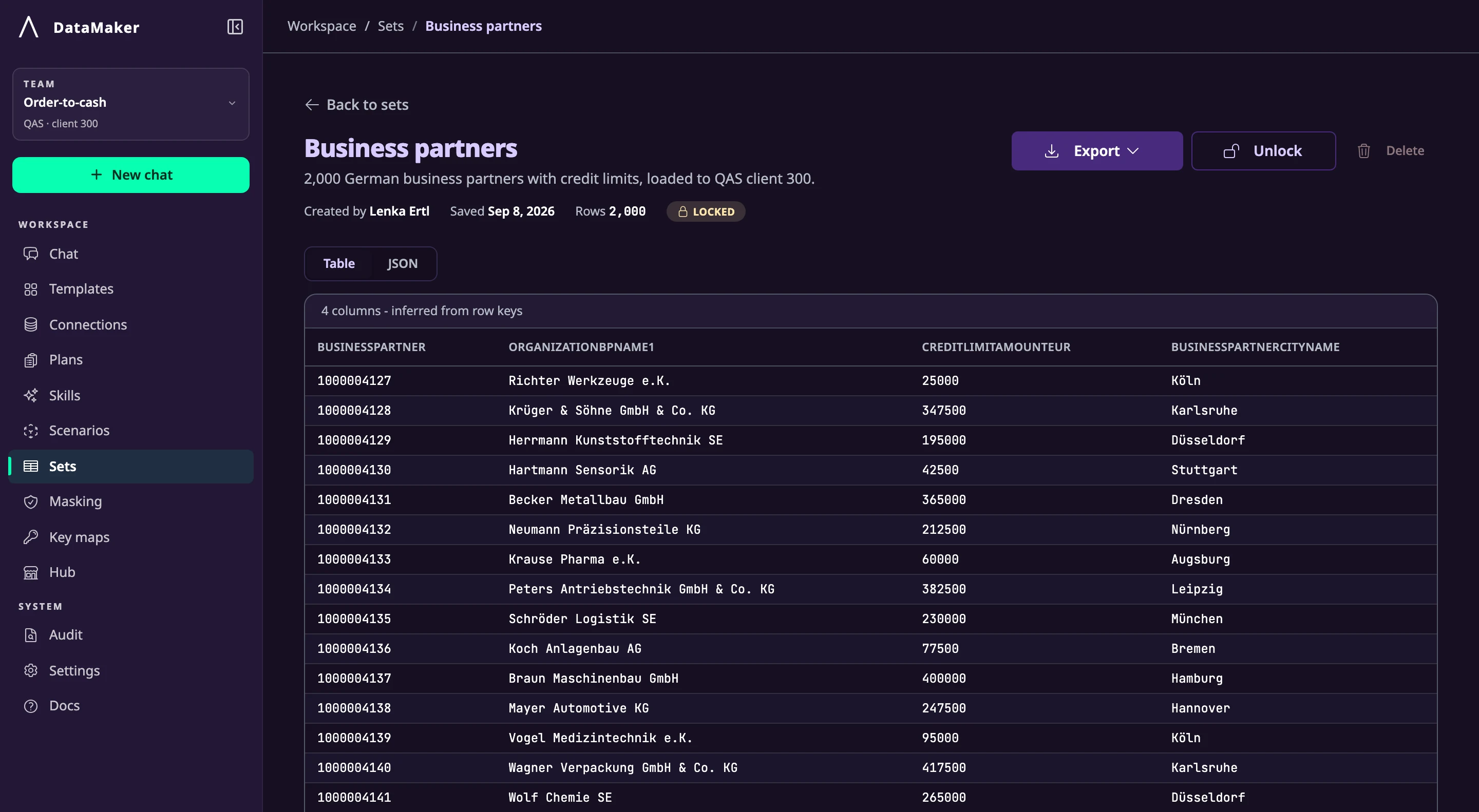
Sometimes you don't need new data, you need real records that match the shape of a test case. Hand the agent a longer prompt with explicit filters and field mappings, and it queries your SAP system, returns a typed table, and saves the set for your regression portfolio. Fields marked sensitive are masked on the way out, so personal data never leaves the system unprotected.

datamaker.automators.com · Chat · regression_bp_deAgent mode
QA
Pull 25 existing SAP Business Partners from
our S/4HANA sandbox for the regression suite.
Filter and field mapping:

  • Country:        DE (90%) · AT (10%)
  • BPCategory:     1 (Person)
  • Industry:       HIGH_TECH or RETAIL
  • BPRole:         FLCU01 (Customer)
  • CreatedOn:      last 90 days

  Required fields: BP ID, Name, Country,
  Industry, TaxNumber1 (USt-ID), IBAN.

Save the set as "reg_bp_de_2026q2".
DM
Inspecting $metadata · 47 fields discovered
Building OData $filter from your mappings
GET /A_BusinessPartner?$filter=…&$top=200
318 matched · sampling 23 DE / 2 AT
Resolved related entities · Address · BankDetails
Masking applied · USt-ID · IBAN
✓ 25 existing BusinessPartners returned · saved as reg_bp_de_2026q2
Refine the set, add a follow-up entity, or push to another tenant…
A_BusinessPartner · 25 rows · reg_bp_de_2026q2Fetched ✓
Fetched from S/4HANAA_BusinessPartner
25returned
318matched
23/2DE / AT
BP IDNameCtyIndustryUSt-IDIBANStatus
1000147Lukas HuberDEHIGH_TECHDE ••• ••• 449DE89 •••• •••• …200 OK
1000148Sophia WeberDERETAILDE ••• ••• 217DE21 •••• •••• …200 OK
1000149Markus BauerDEHIGH_TECHDE ••• ••• 933DE17 •••• •••• …200 OK
1000150Anna SchmidtATHIGH_TECHATU ••• 1209AT48 •••• •••• …200 OK
1000151Jonas MüllerDERETAILDE ••• ••• 826DE60 •••• •••• …200 OK
1000152Lea FischerDEHIGH_TECHDE ••• ••• 580DE12 •••• •••• …200 OK
+ 19 more rows · all 200 OK · 318 total matched
Full Feature Set

Everything you need to generate quality test data.

DataMaker combines a no-code template builder, an AI chat agent, and a Python scenario engine, so every team member can contribute, regardless of skill level.

AI Chat Interface

Chat to generate data instantly

Describe what you need in plain English. DataMaker's AI agent writes the schema, generates the data, and pushes it straight to your database or API endpoint, all from a single prompt.

  1. User prompt
  2. AI understands schema
  3. Data generated
  4. Exported / seeded
50+ Data Types

Realistic data for every field

Choose from over 50 built-in generators, names, emails, addresses, IBANs, credit cards, SSNs, IMEIs, products. Need something custom? Use AI, Python, or your own regex.

First NameE-MailIBANCredit CardPhoneAddressUUIDCompanyDateBooleanProductJob TitlePasswordIPv4ColorSSN

+ Custom types, AI-generated fields, and Python scripts

Reusable Templates

Build once, generate forever

Save your data schema as a reusable template. Share templates across your team, nest objects for complex JSON structures, and generate any number of records on demand, via the UI, API, or AI agent.

  1. Define template fields
  2. Save template
  3. Generate N records
  4. JSON · CSV · DB · API
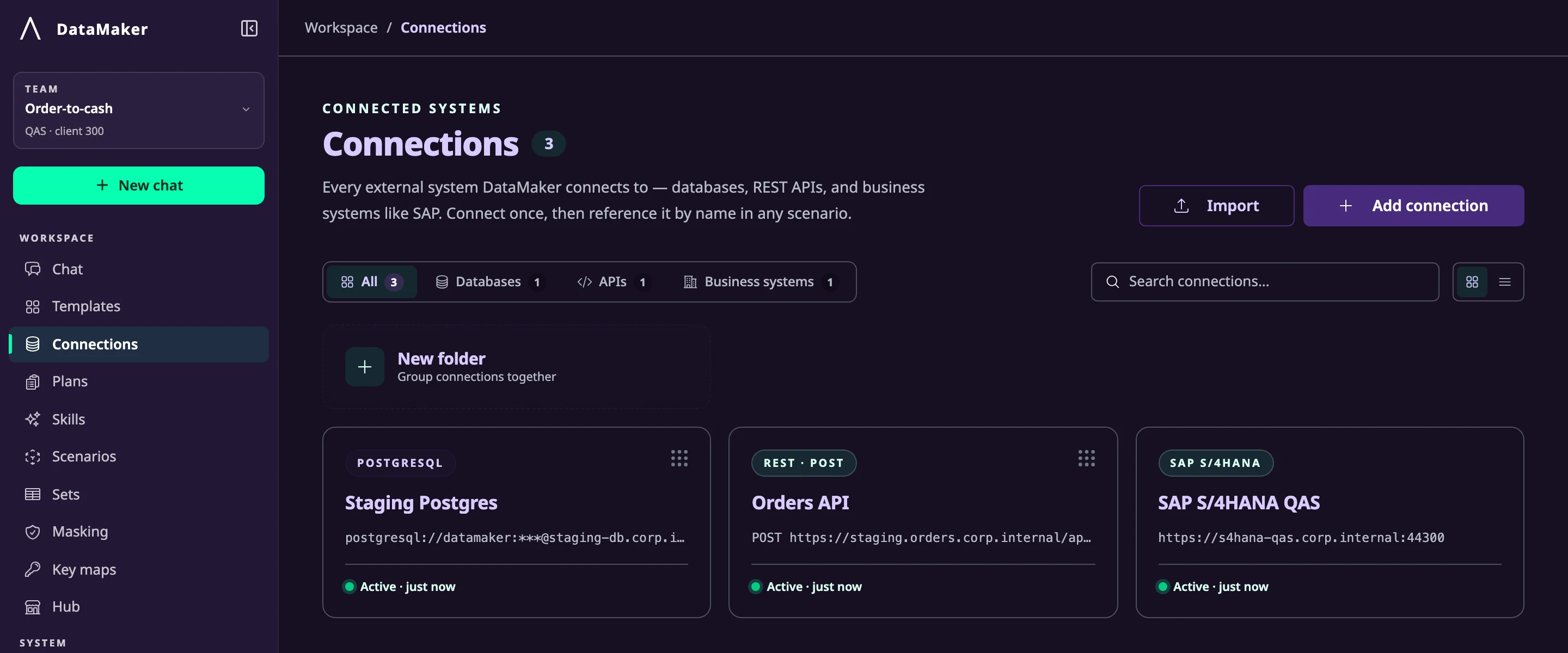
DB & API Connections

Seed databases and APIs directly

Connect to PostgreSQL, MySQL, MongoDB, MSSQL, Oracle, IBM DB2. Or configure REST API endpoints with custom headers and auth, and push generated data straight in.

PostgreSQLMySQLMongoDBOracleDB2REST API
Native SAP OData

First-class SAP integration

DataMaker speaks SAP natively. Connect to any SAP OData V2 or V4 service, inspect entity fields from $metadata, apply OData filters, and POST generated records back, with automatic CSRF token handling.

  • OData V2 & V4 (A2X)
  • Auto-CSRF token handling
  • Fetch, filter & inspect SAP data
  • SAP-specific MCP tools
Python Scenario Engine

Automate complex data workflows

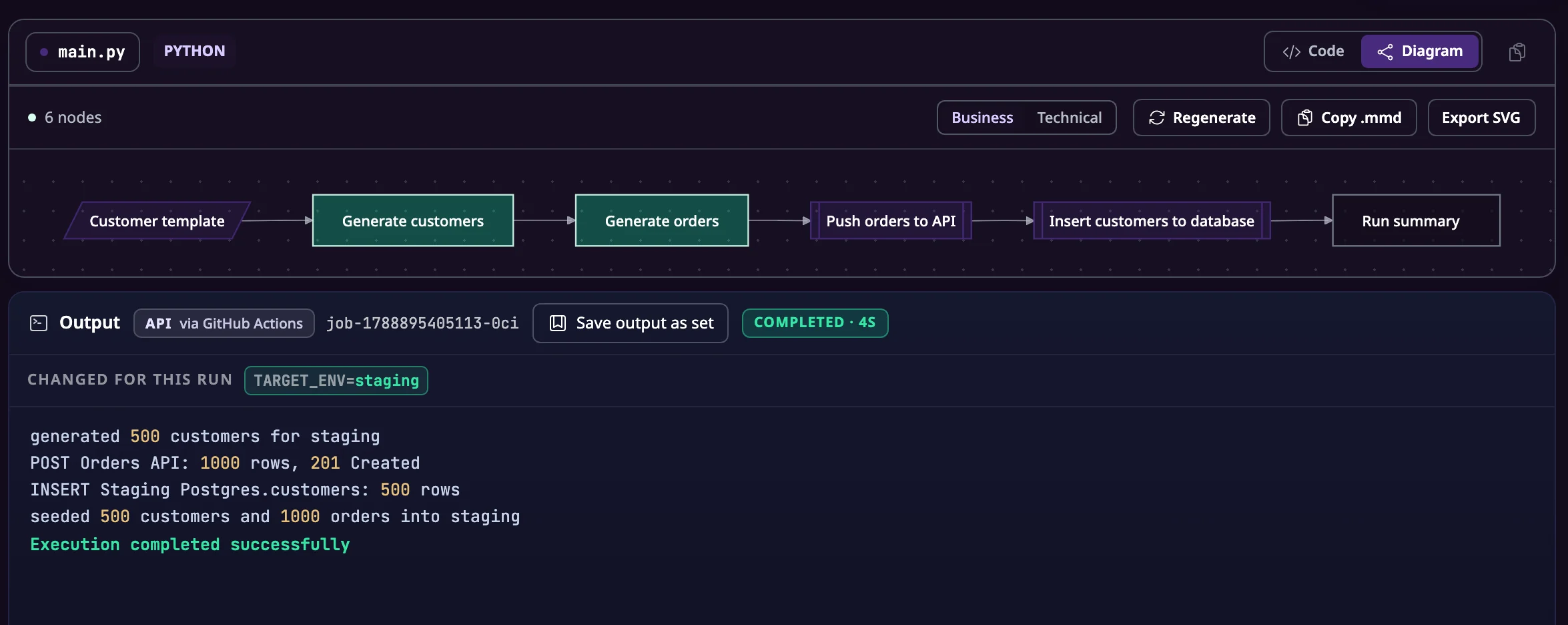
Write Python scenarios to orchestrate multi-step data generation: call APIs, run validations, chain templates, and seed multiple systems in one automated run. Stored, versioned, executable from UI or agent.

Step 1, Generate customers (Template A)
Step 2, Create orders referencing customer IDs
Step 3, POST to staging REST API
Step 4, Insert into PostgreSQL
✓ Complete, 1,000 records seeded
MCP Server

Plug DataMaker into any AI agent

DataMaker ships an MCP server with 25+ tools. Connect it to Claude, Copilot, Cursor, or any MCP-compatible agent so your AI coding assistant can generate and insert test data without leaving the editor.

Cursor · Claude · Copilot
↓ MCP protocol
DataMaker MCP Server
generate_from_id · export_to_endpoint · execute_scenario
Your Database · API
Analyse Existing Data

Turn real data into templates automatically

Upload a JSON, CSV, YAML, or OpenAPI file, or point DataMaker at a live database, and let AI reverse-engineer a reusable template from your existing schema. No manual mapping required.

  1. Upload CSV / JSON / OpenAPI
  2. AI analyses column types
  3. Template auto-generated
  4. Generate N synthetic rows
Runs in Your Network

Your data never has to leave your infrastructure

DataMaker deploys inside your own environment: self-hosted in your data center or private cloud, or as a desktop app on a tester's machine. Credentials, generated data, and the systems being filled all stay behind your firewall.

  • Self-hosted deployment with Docker
  • Desktop app with a fully local mode
  • Credentials stored encrypted, used in-network
  • No detour through someone else's cloud
Governed by Design

AI you can let near your test systems

Templates and scenarios define which fields, value ranges, and systems the agent may touch, and an audit log records every action it takes. We do not just sell data generation. We sell its safe, controlled use inside your company.

  • Guardrails: agent works within your templates
  • Audit log for every generation and delivery
  • Egress control: data goes only where allowed
  • Reviewable like any other test asset
Data Masking & Privacy

Anonymise sensitive data safely

Mask or replace PII fields in your templates. Mark fields as sensitive to prevent accidental export. DataMaker helps you stay GDPR-compliant while still working with realistic, production-shaped data.

  • Mask PII & PHI fields
  • GDPR-compliant generation
  • Prevent accidental export
  • Production-shaped synthetic data
How It Works

From prompt to governed test data in three steps.

STEP 01

Describe

Type a prompt or upload your schema. Tell DataMaker what kind of data you need and how much.

STEP 02

Generate within rules

The agent knows your system: its fields, relationships, and real value ranges. It builds valid data and stays inside the guardrails your team defined. You see a live preview before anything moves.

STEP 03

Deliver and log

Data lands directly in your SAP test client, database, or API, and every step is logged. Export to JSON, CSV, XLS, or SQL whenever you prefer files instead.

Templates & Live Preview

Build data schemas visually, preview instantly

The DataMaker template builder gives you a drag-and-drop field editor with live preview. Add nested objects, set distributions, apply custom Python logic per field, and see realistic sample data update in real time.

  • 50+ built-in data types
  • Nested JSON objects & arrays
  • AI-generated fields
  • Distribution controls (Gaussian, weighted random)
  • Python script per-field generation
  • Custom & reusable data types
Scenario Engine

Automate multi-step data pipelines with Python

DataMaker's scenario engine lets you write Python scripts that orchestrate complex data flows, generate data, call APIs, seed databases, run assertions, and save them as reusable, shareable scenarios. Execute on demand or trigger via API.

  • Full Python environment
  • Access DataMaker API from within scripts
  • Workspace file storage (upload CSVs, reference data)
  • Real-time log streaming during execution
  • AI agent can write and debug scenarios for you
SAP & Enterprise Systems

Purpose-built for SAP environments

Unlike generic data tools, DataMaker understands SAP OData services out of the box. Connect your SAP BTP or S/4HANA system, fetch entity metadata, apply OData filter queries, and POST generated test data back, including automatic CSRF token negotiation.

  • OData V2 & V4 (A2X)
  • Auto-CSRF token handling
  • Fetch, filter, and inspect existing SAP data
  • Export generated data to SAP entities
  • SAP-specific MCP tools for agent-driven workflows
SAP + AI Agent

Seed SAP test data with a single agent prompt.

Here's how DataMaker's AI agent fills a SAP S/4HANA system with realistic Business Partners, Sales Orders, or any OData entity, end to end, hands-free.

  1. 01"Create 10 German Business Partners in SAP"
  2. 02Agent reads SAP OData $metadata
  3. 03Template auto-generated (name, address, IBAN…)
  4. 0410 realistic records generated
  5. 05CSRF token fetched automatically
  6. 0610 × HTTP POST → SAP OData endpoint
  7. 07Business Partners live in your SAP system
DataMaker AI Agent · 5 MCP Tool Calls
1
fetch-endpoint-fields

Reads $metadata from your SAP OData endpoint, discovers fields, types, and required flags automatically.

2
get_templates / create_template_from_json

Checks for an existing SAP Business Partner template or auto-creates one mapping OData properties to DataMaker types.

3
generate_from_id

Generates 10 realistic, locale-aware Business Partner records using German names, postal codes, and IBANs.

4
save_scenario

Writes a Python scenario that loops through records and POSTs each one to the SAP OData endpoint with CSRF token handling.

5
execute_scenario

Runs the scenario in DataMaker's Python worker. Live logs stream back to the chat UI in real time.

Pricing

Start with a pilot. Scale across your teams.

Free

  • For trying it out
  • 3 templates, 1 project
  • JSON & CSV export
  • Community support
Try it out
What Teams Do With It

From one prompt to seeded systems.

"

From a single chat prompt to a seeded SAP test client: the agent reads the service schema, builds the template, and posts valid records.

SAP seeding workflow
"

Pilot teams reach their first usable test data within days of installation, running entirely inside their own network.

Enterprise pilot onboarding
"

AI coding assistants request governed test data through the MCP server without leaving the editor. Same guardrails, same audit log.

Developer workflow
FAQ

Frequently asked questions.

Ready to stop writing test data by hand?

Get realistic, governed test data into your systems, starting with a pilot on your own infrastructure.