SAP continuous testing becomes complex the moment you operate in S/4HANA or hybrid landscapes with custom code, ChaRM-controlled transports, and cross-module dependencies.
A single transport in SD can affect FI postings, billing logic, revenue recognition, and downstream reporting. In highly customized systems, change rarely remains isolated.
Full-regression strategies attempt to manage this risk by testing everything. The result is longer cycles, higher execution effort, and limited visibility into what was actually exposed.
Tricentis, in partnership with SAP, addresses this differently. LiveCompare analyzes transport-level changes and maps technical modifications to impacted business processes. Tosca then validates only the relevant end-to-end flows.
As a certified Tricentis partner, at Automators, we design and implement SAP continuous testing frameworks that integrate impact analysis, automation, and release governance into a measurable architecture.
This guide explains how to plan and implement SAP continuous testing in a controlled, enterprise-ready way.
How to Plan and Implement SAP Continuous Testing with Tricentis
Step 1: Define the SAP Continuous Testing Architecture
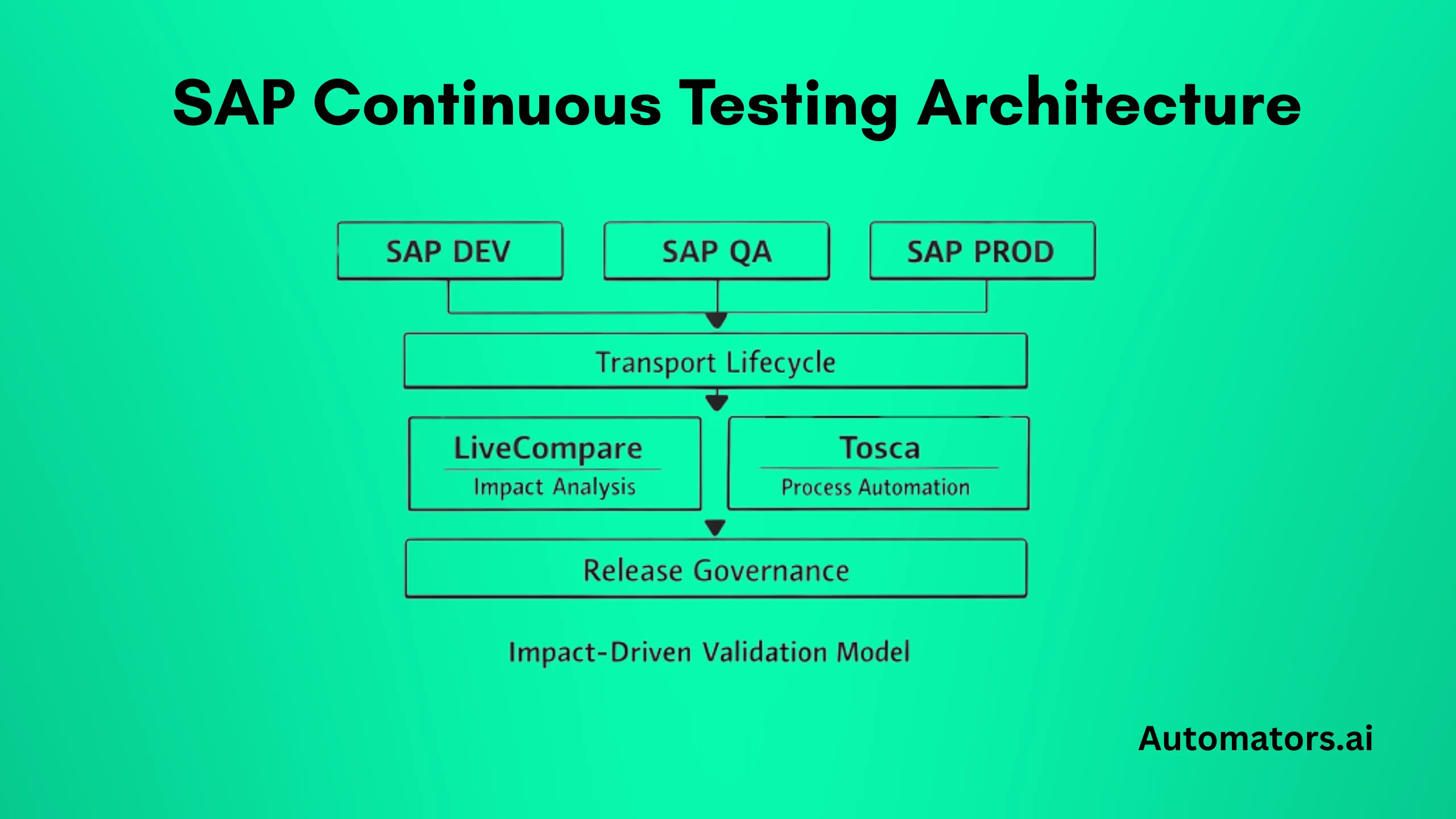
Before implementation begins, you must understand the architectural components involved. SAP continuous testing with Tricentis is not a single tool setup. It is an integrated landscape.
In a typical S/4HANA or hybrid environment, the architecture includes:
- SAP Development, QA, and Production systems
- ChaRM or SAP Cloud ALM managing transports
- Custom code and configuration objects
- Tricentis LiveCompare for transport impact analysis
- Tricentis Tosca for model-based test automation
- Release workflow integration
LiveCompare connects to the SAP repository and analyzes transport contents at object level. It evaluates dependencies across programs, tables, enhancements, and custom developments.
Tosca structures automated tests around business processes. Instead of isolated scripts, it models reusable components aligned to end-to-end flows such as Order-to-Cash or Procure-to-Pay.
The integration point is the transport lifecycle.
When a transport is released from development:
- LiveCompare analyzes modified objects.
- Impacted business processes are identified.
- Tosca dynamically selects relevant test cases.
- Execution is triggered automatically.
- Results are attached to the release artifact.
This flow defines the continuous testing landscape.
Without clear architecture, tool deployment alone will not produce continuous testing.
Step 2: Configure Transport-Triggered Impact Analysis
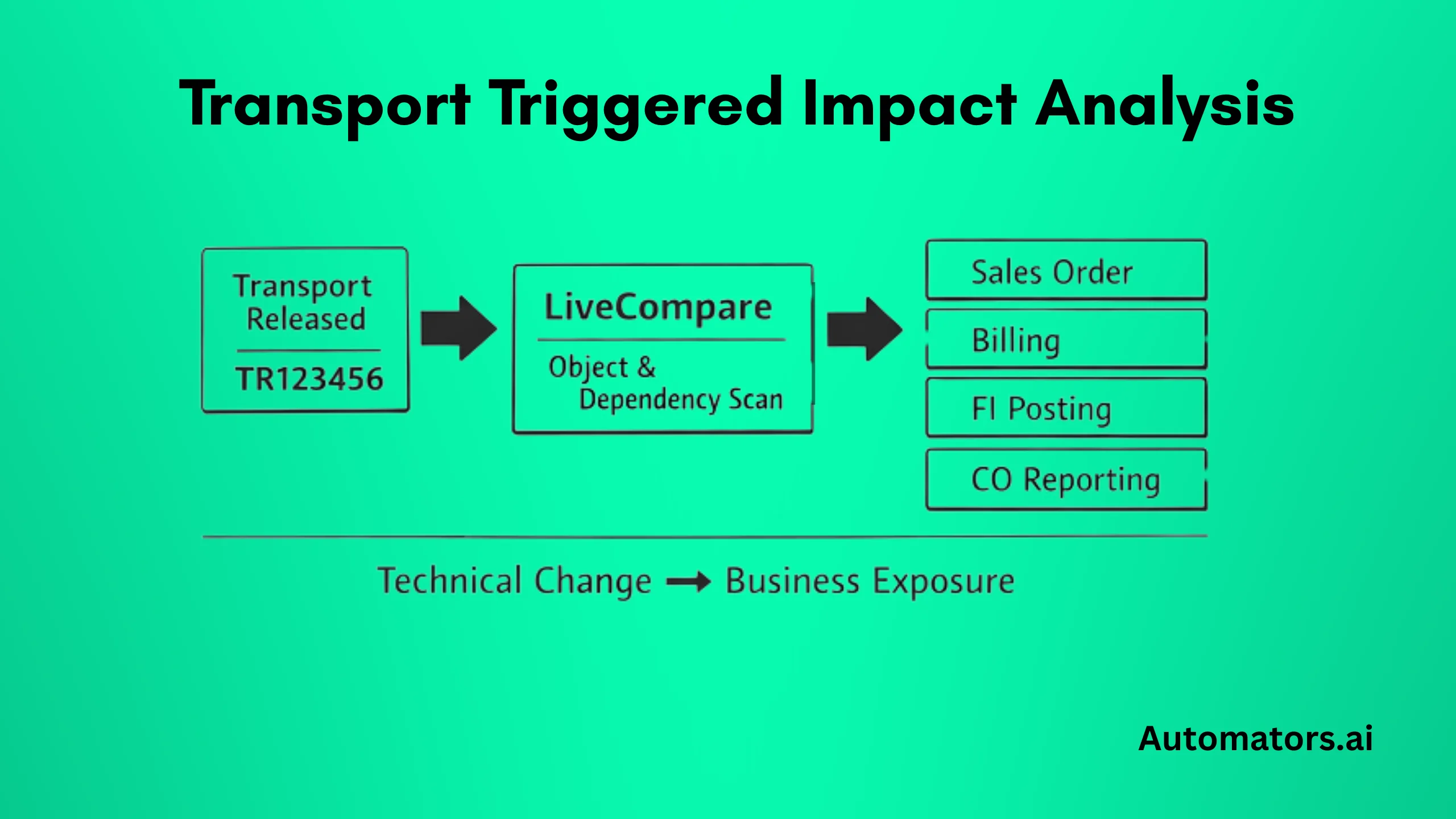
Continuous testing begins at the moment a transport is released. If impact analysis is not automatically tied to the transport lifecycle, the process breaks.
In SAP environments using ChaRM, the trigger point is typically the release status change of a transport request. Once a transport reaches release state, LiveCompare must be invoked automatically. This can be configured through:
- Workflow exit enhancement at release stage
- Automated background job monitoring transport queues
- API-based integration in SAP Cloud ALM or CI/CD pipelines
The key principle is consistency. Every transport must trigger impact analysis without manual intervention.
LiveCompare then evaluates:
- Modified repository objects
- Call hierarchies and program references
- Table dependencies
- Enhancement implementations
- Custom Z-object relationships
In highly customized landscapes, dependency indexing accuracy is critical. If custom developments are not properly analyzed, impact visibility becomes incomplete.
The output of this step is not a test execution. It is a structured impact report showing:
- Which business processes are technically exposed
- Which application components are affected
- Which functional domains require validation
At this stage, no tests have been executed. The goal is clarity, not coverage.
If impact analysis is treated as an optional manual activity, regression filtering will never be trusted. Automation confidence depends entirely on consistent, transport-level impact detection.
Transport-triggered impact analysis is the foundation of SAP continuous testing. Without it, the process reverts to volume-based regression.
Step 3: Align Automation with Business Process Mapping
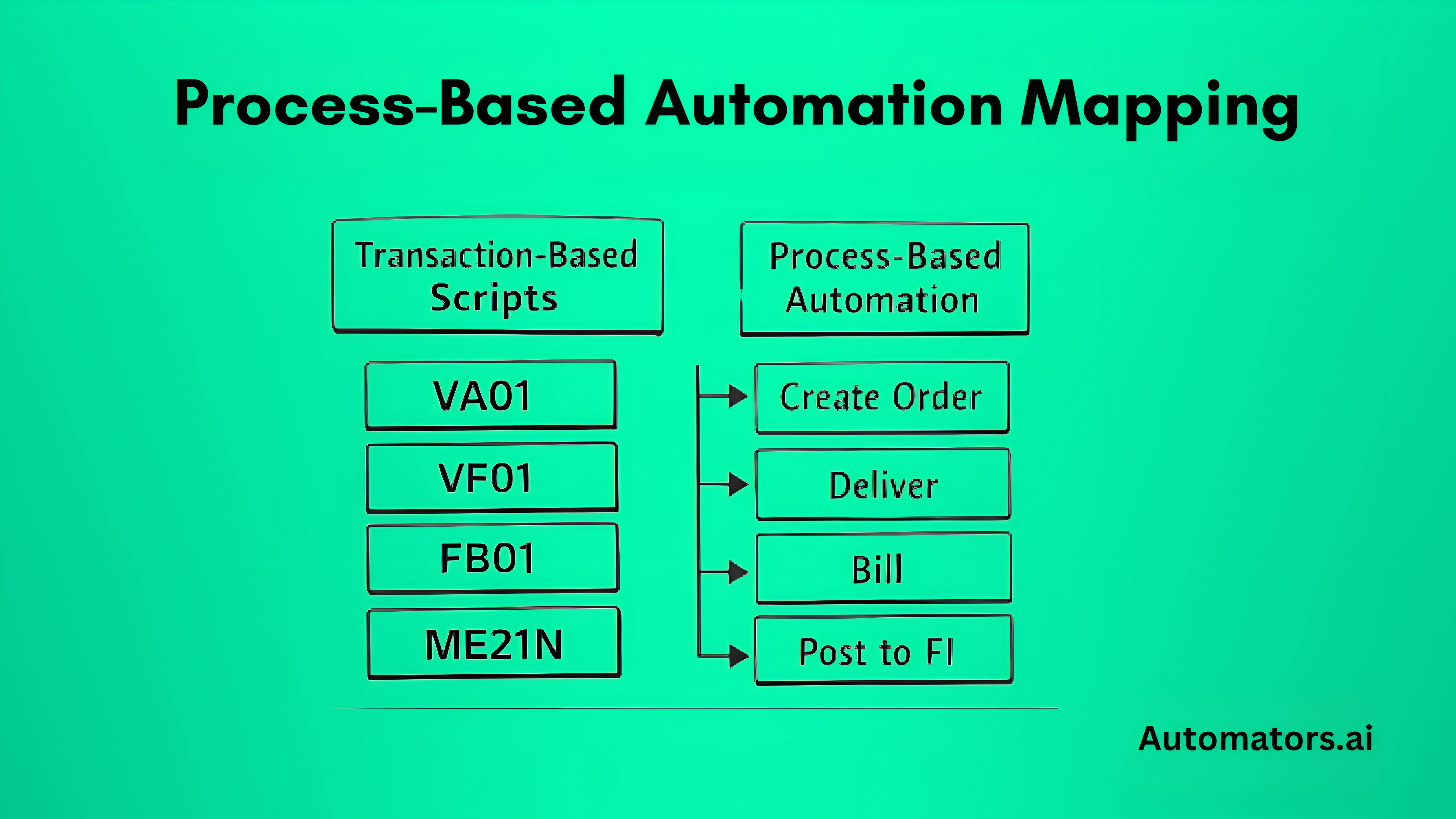
Impact analysis only becomes useful when automation is structured correctly. If test cases are built at transaction level without process alignment, impact-driven regression will not work reliably.
In many SAP programs, automation grows organically. Teams record scripts for individual transactions, screens, or field validations. Over time, this creates a large library of loosely connected test cases. When impact filtering is introduced, there is no clear way to determine which scripts validate which business flows.
To enable continuous testing, automation must be modeled around end-to-end processes.
Instead of building isolated scripts, Tosca should structure reusable business components that represent:
- Create Sales Order
- Deliver Goods
- Generate Billing Document
- Post FI Entry
- Execute Month-End Close
These components are then assembled into complete process scenarios such as Order-to-Cash or Procure-to-Pay.
Each automated scenario must be mapped to:
- Business process identifier
- Application component
- Functional domain
- Related technical objects where applicable
This mapping creates the bridge between LiveCompare impact results and Tosca automation assets.
When LiveCompare identifies impacted processes, Tosca uses these identifiers to dynamically select the relevant automated tests. If automation is not mapped to process-level identifiers, regression selection becomes either incomplete or overly conservative.
A common mistake is attempting to retrofit impact filtering on top of legacy automation without restructuring. This usually leads to partial filtering and low trust in the results.
Process-aligned automation is not just a technical design decision. It determines whether regression compression is precise or approximate.
Once automation and impact analysis are aligned, regression scope becomes proportional to change rather than proportional to total system size.
Step 4: Integrate Automated Execution with Release Governance
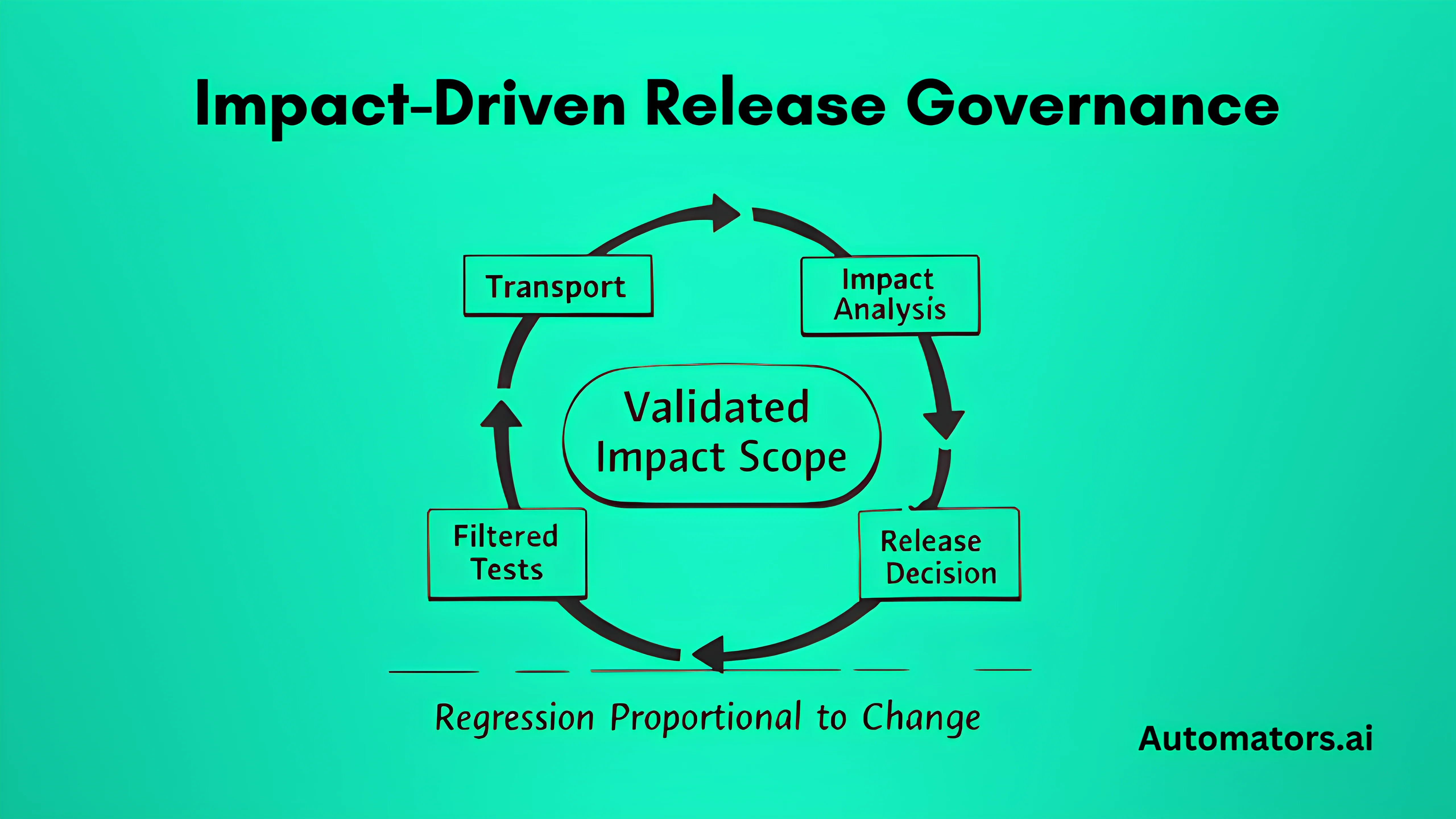
Impact detection and automation selection are not enough. Continuous testing becomes operational only when execution results are integrated into release decision-making.
This integration looks slightly different depending on whether the landscape is ChaRM-driven or DevOps-enabled.
a. In ChaRM-Based Landscapes
In traditional SAP environments, ChaRM manages transport approvals and movement between systems.
Once a transport is released:
- LiveCompare runs automatically.
- Impacted processes are identified.
- Tosca dynamically generates the execution list.
- Automated tests run in QA.
- Results are linked to the transport request.
The impact report and test results should be stored as artifacts within the release documentation. Release managers then approve or reject the transport based on validated impacted scope.
The decision shifts from:
“Full regression completed.”
to
“All impacted business processes validated successfully.”
That distinction changes how risk is assessed.
b. In CI/CD or SAP Cloud ALM Landscapes
In DevOps-enabled SAP environments, transports may be integrated into automated pipelines.
In these cases:
- Transport release triggers an API-based impact analysis call.
- Impact report is generated as part of pipeline stage.
- Tosca execution runs automatically within the pipeline flow.
- Execution results feed back into pipeline status.
If impacted tests fail, the pipeline blocks promotion to the next stage.
The principle remains the same: transport → impact → filtered execution → decision.
The difference lies in orchestration mechanics.
c. Why Governance Integration Matters
Without governance integration, impact analysis and automation remain isolated technical activities.
Continuous testing requires:
- Automatic trigger
- Automatic execution
- Traceable reporting
- Structured approval gate
If results do not influence release decisions, regression remains procedural rather than risk-driven.
When transport-triggered impact analysis, process-aligned automation, and release governance operate as a connected chain, continuous testing becomes predictable and measurable.
Step 5: Stabilize Test Data for Reliable Continuous Testing
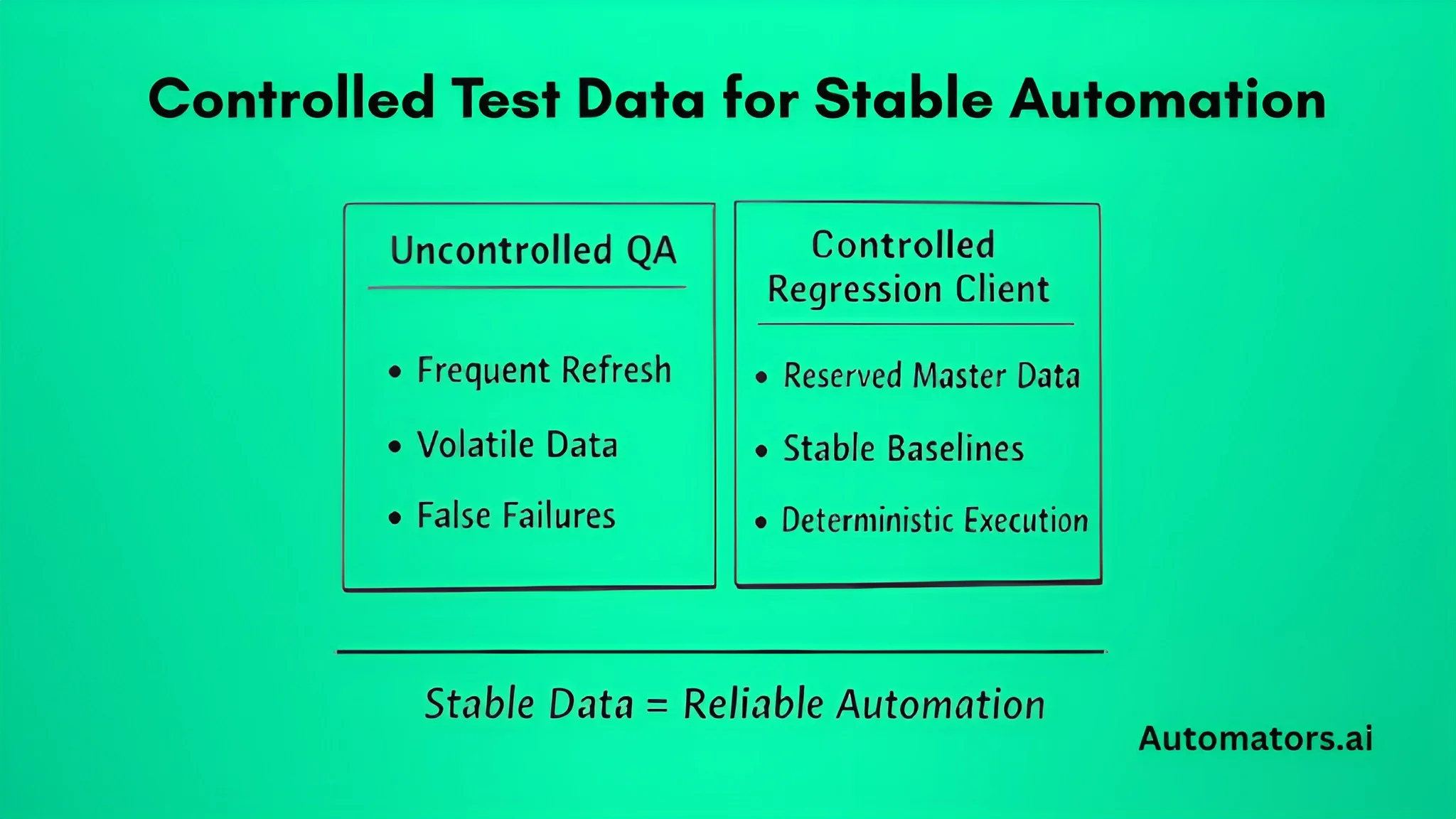
Continuous testing architecture can be technically correct and still fail because of unstable test data.
In SAP landscapes, QA environments are frequently refreshed from production. Client copies, configuration updates, and master data changes are routine. While necessary, these activities introduce variability into automation execution.
When automated tests depend on volatile data:
- False failures increase
- Maintenance effort grows
- Confidence in automation declines
A pricing flow may fail not because of a code defect, but because a required condition record was overwritten during a refresh. A billing test may break because customer master data changed. Over time, this erodes trust in impact-driven regression.
Stable continuous testing requires controlled data conditions.
This typically includes:
- Dedicated regression clients
- Reserved master data sets
- Resettable transactional baselines
- Isolation between exploratory testing and automated regression
In highly regulated environments, production data copies may not be allowed. Masked or synthetic datasets become necessary to ensure repeatable and compliant testing.
This is where structured test data generation becomes important.
Automators supports SAP continuous testing environments with DataMaker, a test data generation and masking solution designed to create stable, realistic datasets aligned with business processes.
Instead of relying on inconsistent copied production data, organizations can generate controlled datasets tailored to automated regression flows.
The objective is not more data. It is deterministic data.
Automation Stability Index can be used to measure reliability:
Automation Stability Index = Successful Test Runs ÷ Total Triggered Runs
In mature environments, this should consistently exceed 85–90%. If stability fluctuates without corresponding code changes, data volatility is usually the root cause.
Impact-driven regression depends on three aligned layers:
- Accurate impact detection
- Process-aligned automation
- Stable test data
If one layer becomes unstable, confidence in continuous testing declines.
Step 6: Start with a Controlled Pilot and Scale Based on Evidence
Continuous testing should not begin enterprise-wide. It should start where regression pain is visible, measurable, and tied to business risk.
a. Selecting the Right Pilot Domain
The pilot domain should be business-critical, frequently changed, and associated with long or unstable regression cycles. Order-to-Cash is often a strong starting point because it spans SD, FI, pricing logic, and reporting. Financial closing cycles are also suitable in S/4HANA-heavy environments where integration risk is high.
Avoid starting with peripheral modules. Continuous testing must demonstrate value where regression effort is significant and clearly felt.
b. What the Pilot Must Demonstrate
Within the first 60 to 90 days, the pilot should produce measurable operational outcomes, not theoretical improvements.
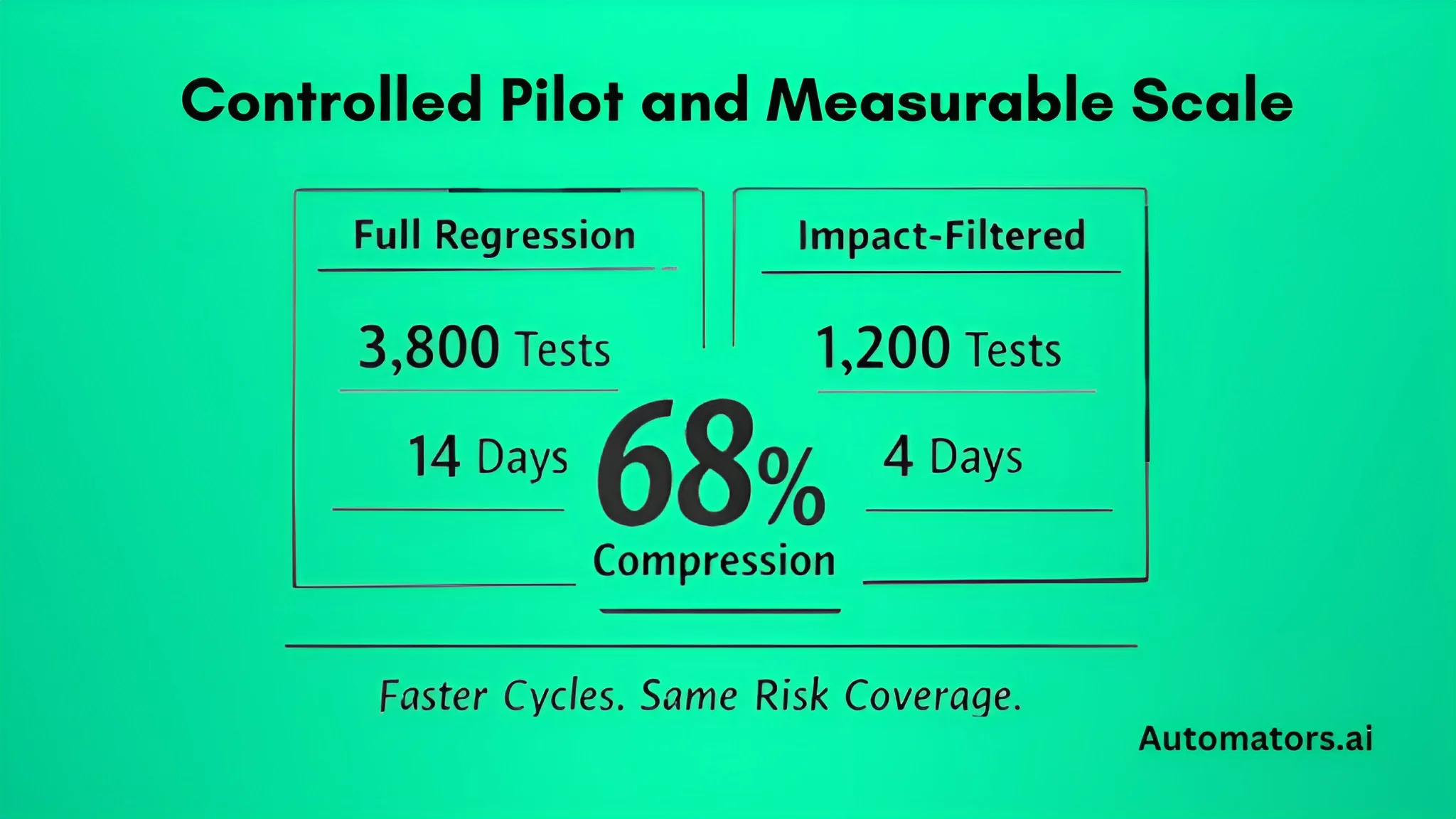
The first key metric is regression compression. This is calculated as:
Regression Compression Ratio = Total Regression Library ÷ Impact-Filtered Execution Size
For example, if the regression suite contains 3,800 automated tests and impact filtering selects 1,200, the compression ratio is 68 percent. This demonstrates that regression effort is becoming proportional to actual system change.
The second indicator is execution duration. If full regression previously required 12 to 14 days, filtered execution should reduce that to approximately 4 to 5 days depending on change scope. Shorter cycles improve release validation speed, reduce coordination overhead, and provide faster feedback to development teams.
Defect leakage must also remain stable. Reduced regression scope should not result in increased production incidents. Track post-release defects related to changed transports and observe the trend across multiple cycles. Stable or declining defect patterns indicate that impact-driven validation is working correctly.
Finally, monitor the Automation Stability Index:
Automation Stability Index = Successful Runs ÷ Total Triggered Runs
Execution reliability should consistently exceed 85 to 90 percent. If stability declines without corresponding code changes, data volatility or fragile automation design is usually responsible.
c. Scaling After Pilot
Scaling should begin only after the pilot confirms measurable regression compression, stable defect trends, reliable automation performance, and proper governance integration.
Expansion typically involves extending impact mapping to additional domains, increasing process-aligned automation coverage, formalizing automation ownership responsibilities, and strengthening test data governance.
Automation growth should follow change frequency and business risk exposure. Continuous testing is not about maximizing automation count. It is about aligning validation effort with system change and business impact.
Practical Example: Transport-Level Impact
Consider transport TR123456 modifying class Z_SD_PRICING_EXIT.
When the transport is released, LiveCompare evaluates the modification across call hierarchies, table access dependencies, enhancement implementations, and downstream program usage. The analysis reveals exposure across sales order processing, billing generation, FI revenue posting, and CO profitability reporting.
Out of a regression library containing 3,500 automated tests, 1,050 are mapped to these impacted flows. Instead of executing the entire suite, Tosca runs only the relevant scenarios.
Execution time reduces from 12 days to 4 days.
Regression Compression Ratio = 3,500 ÷ 1,050 = 70% reduction.
The release decision is now based on validated impacted processes rather than precautionary full regression. This illustrates the operational difference between volume-based testing and impact-driven validation.
Common Pitfalls and How to Avoid Them
Continuous testing initiatives often struggle not because of tooling limitations, but because of structural misalignment.
1. Running Full Regression “Just in Case”
This typically reflects low confidence in impact mapping accuracy. The solution is controlled validation during the pilot phase. Run filtered and full regression in parallel for a defined period, compare defect detection patterns, and gradually reduce fallback execution once evidence builds trust.
2. Automation Built at Transaction Level
When scripts validate individual screens instead of complete business flows, impact filtering becomes unreliable. Automation must be restructured into reusable, model-based process components aligned to end-to-end scenarios.
3. Manual Impact Execution
If LiveCompare is triggered manually rather than through transport lifecycle integration, consistency breaks. Impact analysis must be embedded directly into release status changes or pipeline triggers.
4. Unstable Test Data
Environment refreshes frequently disrupt baseline conditions. Without controlled regression datasets, false failures increase and confidence declines. Stable data governance is essential.
5. Scaling Without Ownership
Automation expansion without defined lifecycle governance leads to maintenance backlog and declining reliability. Clear ownership for mapping updates and automation health reviews must be established early.
When to Bring in a Tricentis Partner
In smaller or less customized landscapes, basic automation may be implemented internally. However, structured SAP continuous testing requires architectural discipline.
If your landscape is highly customized, preparing for S/4HANA migration, struggling with long regression cycles, or integrating SAP into CI/CD pipelines, impact-driven regression becomes a design problem rather than a configuration task.
Successful rollout requires disciplined impact mapping, process-aligned automation modeling, release workflow integration, and stable data governance. Tool enablement alone does not guarantee continuous testing capability.
A Tricentis partner can help design the architecture, validate mapping accuracy, and ensure rollout decisions are measurable rather than experimental.
Final Words
SAP continuous testing cannot rely on expanded regression volume alone. In S/4HANA and hybrid landscapes, technical change must connect directly to business validation.
Tricentis provides the foundation through LiveCompare and Tosca. When implemented with transport-triggered impact analysis, process-aligned automation, controlled data, and release integration, regression becomes proportional to change.
The measurable outcomes are straightforward: reduced execution effort, shorter release cycles, quantifiable regression compression, and clearer risk visibility.
With structured implementation, SAP Enterprise Continuous Testing becomes an operational capability rather than an oversized regression program.