In March 2010, Queensland Health launched a new SAP payroll system before testing was fully complete. The result became one of the most well-known SAP failures in history. Nearly 78,000 healthcare workers were paid incorrectly, or not paid at all, because critical business processes had not been properly validated before go-live.
The system itself technically worked. Screens loaded. Transactions processed. But the real problem was deeper: the business process failed.
That is exactly what functional testing in SAP is designed to prevent.
Functional testing verifies whether a business process behaves correctly from start to finish. It checks whether transactions, configurations, validations, and financial postings produce the outcomes the business actually expects, across modules, users, and workflows.
If you're new to SAP testing, this guide will walk you through:
- what functional testing actually means
- how SAP testing environments work
- the core business scenarios SAP teams test most often
- how to execute a functional test step-by-step
- the common mistakes that lead to production failures
By the end, you'll understand not just how to run a test, but what you're really validating underneath the transactions and screens.
What functional testing in SAP actually means
Functional testing is the process of confirming that your configured business processes do what your business actually needs them to do.
Read that word again: processes. Not screens. Not buttons. Not single fields.
This is the distinction almost every beginner trips over. In ordinary software testing, you might check whether a button works or a form submits. In SAP, you're checking whether a complete business operation, from the first action to the final accounting entry, produces the correct outcome at every handoff in between.
Take a sales order. You're not testing whether the order saves. You're testing whether saving it correctly triggers a delivery, which triggers a goods issue, which generates an invoice, which posts the right entry into the financial books. Each arrow in that chain is a place where things can quietly go wrong while every individual screen still looks fine.
So functional testing asks a specific set of questions. Does the process produce the expected output? Does data move correctly from one module to the next? Does the system behave when you feed it good input, and just as importantly, when you feed it bad input? Do your configurations behave the way they were designed to?
It's just as useful to know what functional testing leaves to others. It doesn't measure how fast the system runs under load, which is performance testing. It doesn't probe whether the system resists attackers, which is security testing. And it doesn't check individual lines of ABAP in isolation, which is unit testing. Functional testing lives in the middle of all that, at the layer where business reality meets system behaviour.
You test in QA, never in Production
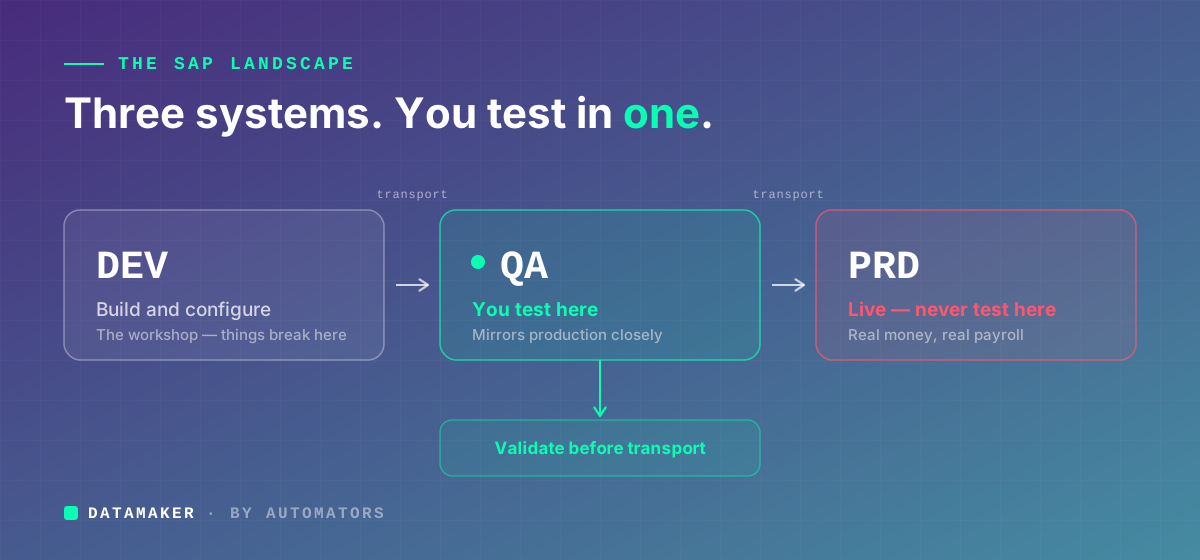
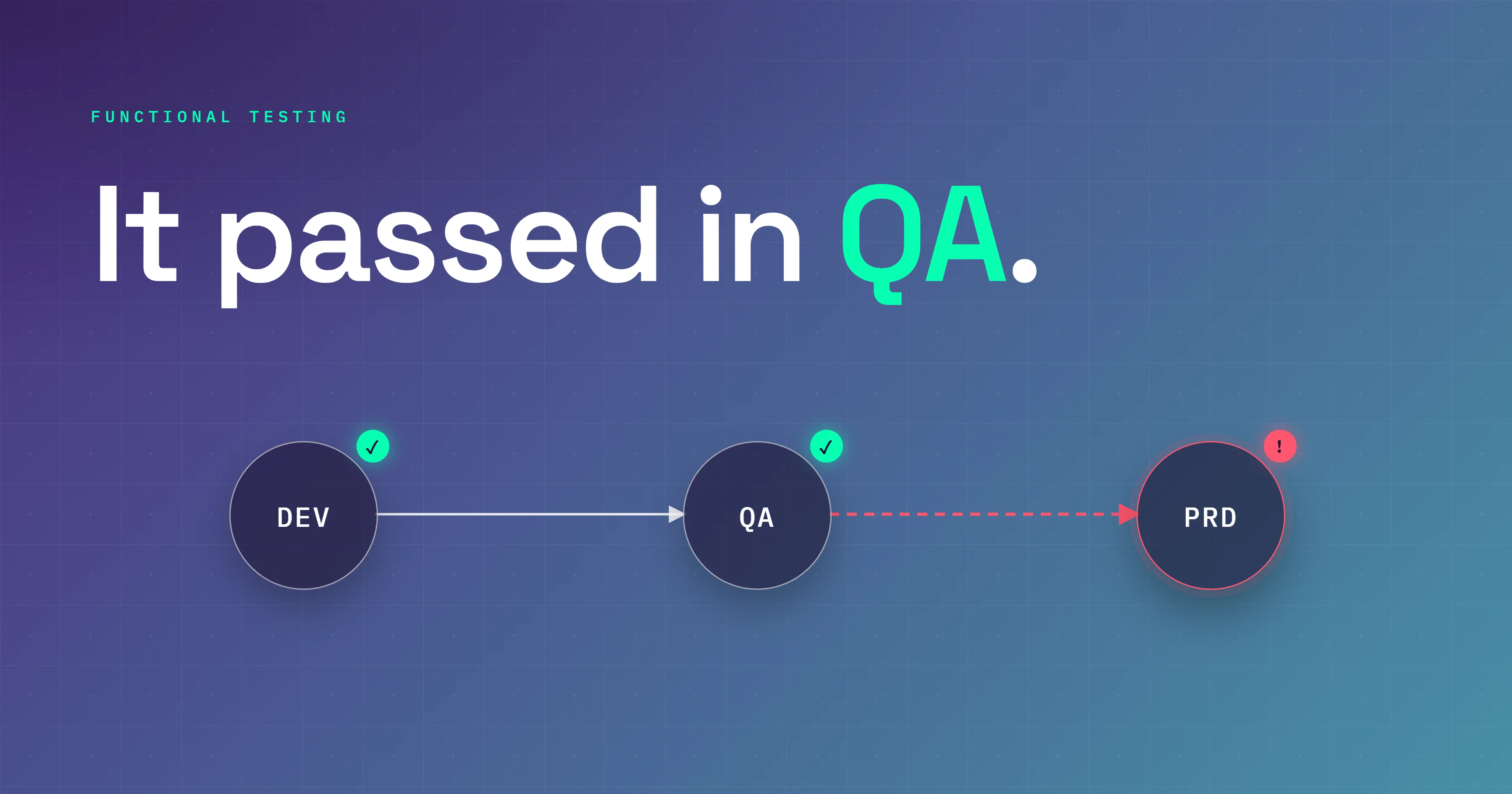
The first surprise for most beginners: SAP isn't one system. It's three. And you're only ever allowed to test in one of them.
DEV is where the building happens. Configuration changes, customisations, and ABAP development all start here. Things break in DEV constantly, and that's the point. It's the workshop.
QA is where you test. Once a change is ready in DEV, it gets transported to QA, an environment built to mirror Production as closely as possible: realistic data, proper user roles, the same configuration your end users will eventually touch. This is your stage for functional testing.
PRD is the live system. Real payroll, real invoices, real money moving. You do not test here. Ever. The Queensland story is what "testing in Production by accident" looks like when it goes wrong at scale.
Changes ride between these systems in transports, which are packages of configuration and code that travel DEV to QA to PRD in that order. Every transport that lands in QA has to be validated by functional testing before it goes anywhere near Production. When a colleague says "we need to test this before transporting," that's the sequence they mean: prove it in QA first, move it to PRD second.
The four business scenarios you'll keep meeting
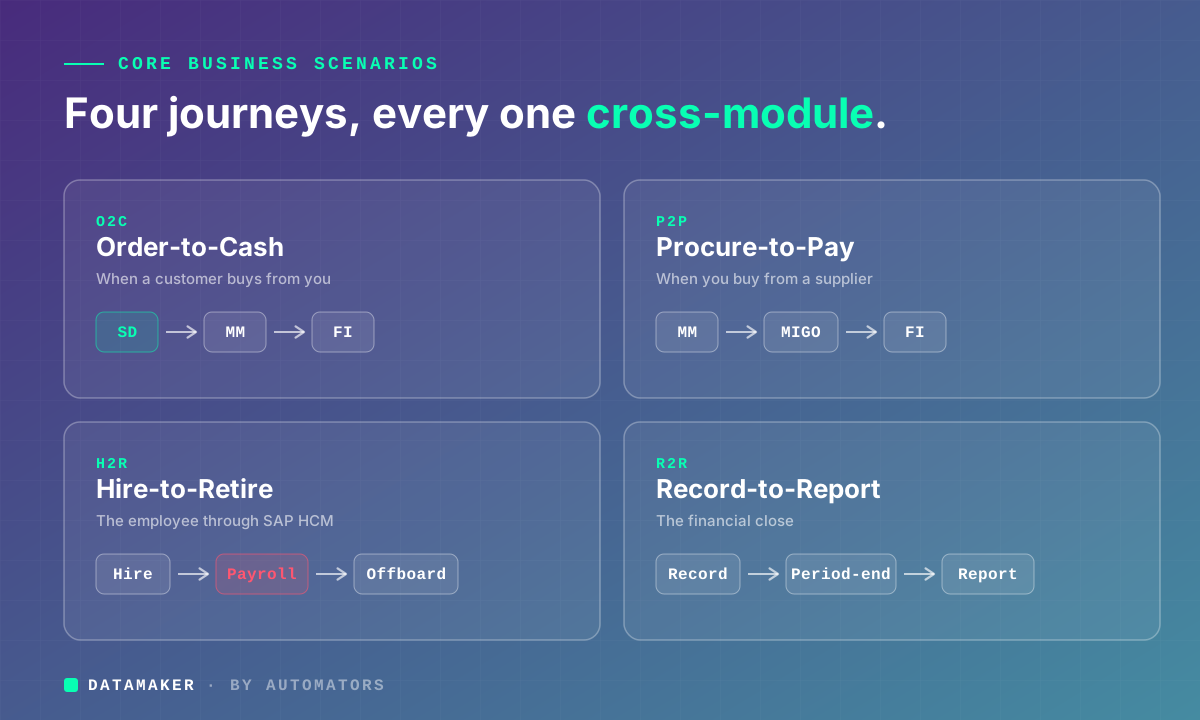
SAP testing isn't random clicking. It's organised around end-to-end business scenarios, the full journeys real operations follow. Four of them come up constantly, and you'll want to recognise each on sight.
Order-to-Cash (O2C) is everything that happens when a customer buys from you. The order comes in, a Sales Order is created in SD, stock is checked, goods are picked and shipped, a delivery is posted, an invoice goes out, and payment lands and gets recorded in FI. Testing O2C means validating that whole chain, not just the order screen.
Procure-to-Pay (P2P) is the mirror image, covering everything that happens when your company buys from a supplier. A requisition gets raised and approved, becomes a Purchase Order in MM, goods are received through MIGO, the vendor invoice posts through MIRO, and payment runs in FI. A functional test here might catch a nasty one: the goods receipt posts perfectly, but the journal entry lands in the wrong GL account.
Hire-to-Retire (H2R) follows the employee through SAP HCM, from hiring and onboarding to payroll and time management and eventually offboarding. Payroll is the tender spot. A wrong tax setting or a misassigned pay scale doesn't throw an error. It just prints a wrong number on a real person's payslip. Ask Queensland Health.
Record-to-Report (R2R) covers the financial close: how transactions are recorded, how period-end works, how reports are produced, how figures roll up into statements. A mistake here doesn't annoy one department. It can misstate the whole company's financial position.
Notice that every one of these crosses several modules. That's the entire reason functional testing has to follow a scenario end to end, rather than checking modules one at a time in isolation.
How to actually run a functional test
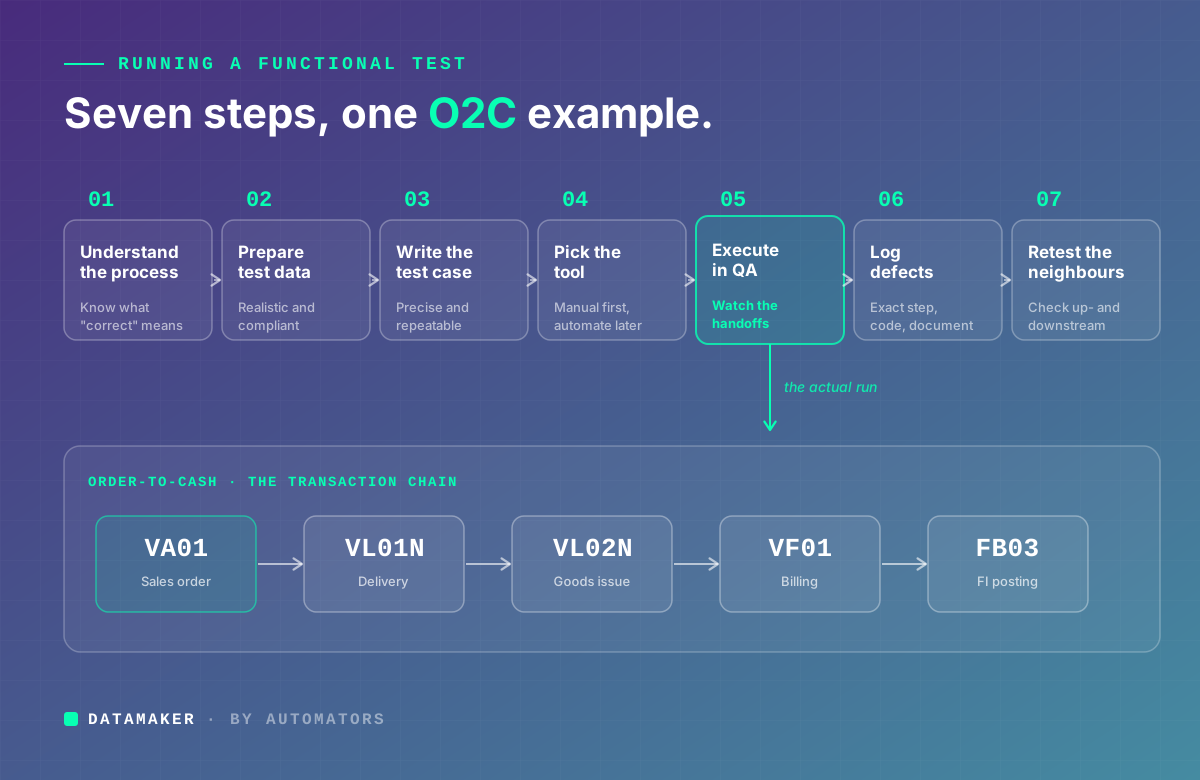
Enough theory. Here's how a test gets executed in practice, using Order-to-Cash as the running example.
Step 1: Understand the business process first
Before you open SAP, understand what you're testing in business terms. Pull the process documentation or the functional spec. Talk to the business stakeholder if anything is fuzzy. You need to know the expected input, what should happen at each stage, and what "correct" looks like at the finish line.
For O2C, that means knowing which company code, which sales organisation, which customer, which material, what pricing applies, and what financial posting you should see at the end. Skip this and you're not testing. You're just clicking through screens hoping they light up green.
Step 2: Prepare your test data
This is where beginners underestimate the work, and it's the step that quietly decides whether your testing is worth anything.
You need data that behaves like the real world: a customer master that exists in QA, a material that actually has stock, valid pricing conditions, correct tax configuration. You can't just copy Production data over, because privacy and compliance rules forbid moving real customer and employee records into a test system.
So teams build test data by hand, and that's where the trouble starts. Hand-built data tends to be too clean and too simple. The test sails through QA because the data was tidy, then the same process fails in Production the moment it meets messy, real-world records. This single gap, clean test data hiding real-world complexity, is behind a huge share of "but it passed in QA" failures.
It's worth knowing this is a solved problem. A category of purpose-built test data generation tools creates realistic, compliant, suitably messy SAP test data without copying anything sensitive out of Production, which is usually where the realistic-versus-compliant tension finally breaks in your favour. (Ours, DataMaker, is one such tool.) Whatever method you choose, the principle holds: your test data has to reflect the real complexity your process will face, or your green checkmark is fiction.
For an O2C test, confirm in QA that a customer master exists with correct payment terms, that the material is set up with proper pricing, that stock is actually available, and that the company code and sales org match what Production will run.
Step 3: Write the test case before you touch anything
A test case is not "create a sales order and check it works." That's a wish, not a test. A real test case is precise and repeatable, written so that someone who has never seen it can follow it and land on exactly the same result.
Every test case carries a few things: the preconditions that must be true before you start (say, "Customer 10001 exists in QA with a $50,000 credit limit"), the step-by-step execution with exact transaction codes and field values, the expected result at each stage, the actual result you fill in as you go, and a final pass or fail based on whether the two matched.
For the first O2C step, that looks concrete:
Execute T-code VA01. Order Type OR. Sales Org 1000, Distribution Channel 10, Division 00. Customer 10001, Material M-001, Quantity 10. Save. Expected: order created, availability check passes, order number generated.
Then you write a case like that for every link in the chain. Not just order creation, but the delivery (VL01N), the goods issue, the billing document (VF01), and the FI posting that should result.
Step 4: Pick the right tool, eventually
For manual functional testing, which is where every beginner should start, you work directly in the QA system through the SAP GUI or Fiori, depending on your version. You follow your test case and record what happens.
As you grow, you'll meet tools built for SAP automation. SAP's own eCATT records and parameterises scripts inside the system with no third-party licence, which makes it a sensible first taste of automation.
For larger and more modern landscapes, SAP now points customers toward Tricentis, offered as SAP Test Automation and integrated with SAP Cloud ALM, which has been SAP's strategic direction for test automation since 2020.
Tricentis Tosca and Worksoft Certify round out the enterprise side: both are widely used, codeless, and built around business processes rather than individual transactions, which suits long O2C and P2P chains.
A word of caution though: don't sprint to automation. Learn manual testing properly first. Automation scales good tests. It also faithfully scales bad ones, so a poorly designed test just fails faster and more often once you automate it.
Step 5: Execute in QA and watch the handoffs
Run the case step by step in QA, and record what you actually see rather than what you expected to see. Capture screenshots at the moments that matter, especially financial postings and error messages. Flag any deviation the instant it appears, even a small one. And resist the urge to skip a step because it "looks fine."
The real skill shows up at the handoffs. After the sales order, check that the delivery triggered correctly. After the goods issue, open the material document and the accounting document it generated. After billing, pull the FI document and ask the pointed questions: did it hit the correct revenue account? Does the tax match? That's the cross-module habit that separates real testers from screen-clickers.
Step 6: Log defects so someone can actually fix them
When actual doesn't match expected, you've found a defect. Log it with the exact step that failed, what you expected versus what happened, the transaction code and document number involved, and a screenshot.
"The billing didn't work" helps nobody and wastes a developer's afternoon. Compare it to this: "After goods issue via VL02N on Delivery 80000123, the FI document in FB03 posts to GL account 400000 instead of the expected 800000." One of those gets fixed today. The other gets a reply asking what you meant.
Step 7: Retest, then check the neighbours
Once the fix is transported back to QA, retest the exact scenario that broke. Then run a quick check on the processes immediately upstream and downstream, because in SAP, repairing one thing has a habit of quietly denting another. Doing that check deliberately, even by hand, is regression awareness, and it's a discipline worth building early.
The mistakes that actually break SAP testing
These aren't theoretical risks. They're the specific habits that send broken configuration into Production.
Testing only the happy path. The happy path is the run where everything's perfect: clean data, no edge cases, nothing unexpected. Real operations are never that polite. A customer blows past their credit limit. A material runs out. A vendor invoice arrives with a price mismatch. If you only ever test the tidy version, you have no idea what the system does when reality shows up. Always run at least one negative scenario per process. For O2C: when a customer exceeds their credit limit, does the system block the order the way it should, or wave it through?
Skipping cross-module validation. This is the most dangerous one, and it's specific to how SAP is built. You test the sales order, it creates cleanly, you mark it passed. But you never checked whether the FI accounting document generated correctly, or whether the stock movement hit the right storage location. SAP modules are wired tightly together. SD feeds MM, MM feeds FI, FI feeds CO. A test that validates a single module hands you false confidence. Follow the data all the way to where it finally lands.
Using unrealistic test data. We touched on this earlier, and it earns a second mention because it's that common. Test with one material, one company code, one currency, when Production runs many company codes, several tax jurisdictions, and multiple currencies, and your coverage has a blind spot the size of a warehouse. Build data that matches your real complexity, not a simplified cartoon of it.
Not documenting results. "We tested it and it worked" is not a test result. It's a memory. Memories aren't auditable, aren't repeatable, and are spectacularly unhelpful when something breaks in Production three months later and someone asks what was actually tested before go-live. Record every execution, pass or fail, with the real results.
How functional testing relates to the other testing types
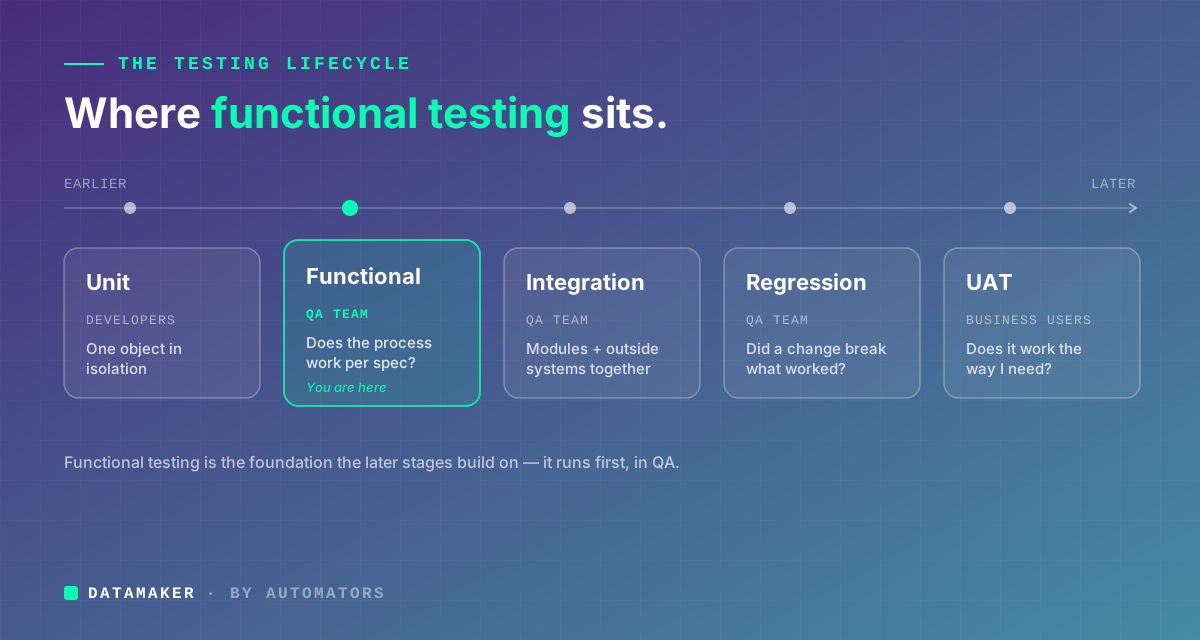
Beginners hear these terms thrown around as if they're interchangeable. They aren't.
Unit testing is done by developers on individual objects, like a custom ABAP function or a report, in isolation before anything is integrated. It's checking a single gear before it goes into the machine.
Integration testing confirms that modules, and SAP with outside systems, work together. Where functional testing proves the O2C process works inside SAP, integration testing proves that a sales order also pushes the right data to an external CRM or warehouse system through an IDoc or API.
Regression testing runs after a change to confirm existing processes still work. In S/4HANA Cloud, with its quarterly releases, this has shifted from a one-off event into a continuous discipline.
User Acceptance Testing (UAT) is functional testing done by the actual business users rather than the QA team. It's the final human check before go-live. If functional testing asks "does this work according to the spec," UAT asks "does this work the way I actually need it to in my job."
Functional testing sits early in the lifecycle, after unit testing but before integration, regression, and UAT. It's the foundation those later stages build on.
Where to go from here
If you're starting from nothing, here's the honest path.
Learn the business processes before the system. The biggest gap for beginners isn't SAP knowledge, it's business knowledge. Understand what Order-to-Cash genuinely means in a working company before you try to test it. SAP's own free courses at learning.sap.com cover the core processes well.
Get your hands on a practice system, because you cannot learn this by reading. The SAP Learning Hub offers sandbox access, and IDES, SAP's demonstration system, comes pre-loaded with demo data that many learning programs hand you.
Pick one module and go deep rather than spreading thin across all of SAP. Lean toward SD if O2C interests you, MM if procurement does, FI if you come from finance. Learn it well enough to follow a transaction start to finish and recognise a correct result when you see one.
Write the test case before you execute, even in practice. Preconditions, steps, expected results, all written down before you click. That single habit is what separates a tester who finds real defects from one who just watches screens load.
And learn to read a financial document. Every significant SAP transaction produces an accounting document, and being able to open one in FB03, see which GL accounts were hit, confirm the debits and credits balance, and check the posting period, will make you far more effective than someone who only trusts the cheerful confirmation message on the surface.
Queensland Health wasn't a freak event. Versions of it happen across industries every year, in companies of every size. The line between a clean go-live and an expensive disaster almost always comes down to the quality of the functional testing that happened first.
And that testing always starts in the same place: understanding what you're really trying to validate. Not screens. Not buttons. The business processes that real people depend on, every single day.