TL;DR
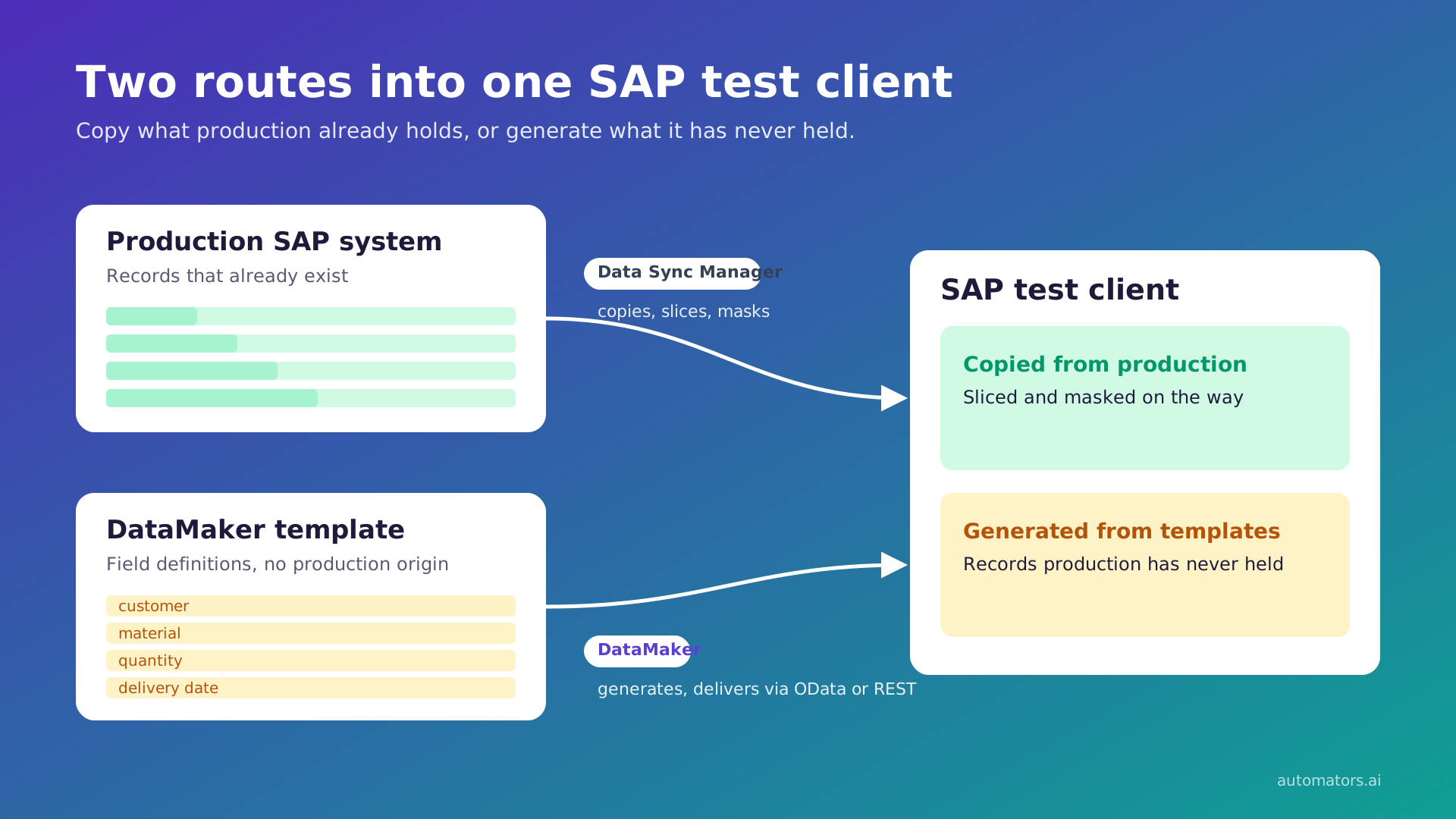
- EPI-USE Data Sync Manager copies real SAP data into test systems and masks it. DataMaker generates new records from templates and masks existing data where you still need it.
- Choose DSM to refresh whole clients, mask real SAP data across a landscape, reproduce a production issue, or test HCM and payroll.
- Choose DataMaker for data production has never held: future-dated scenarios, cases the business has not hit yet, and negative test rows built to be rejected.
- They can run side by side. DSM builds a masked baseline from production, and DataMaker adds what a copy cannot contain.
- Neither vendor publishes a price list, so get a quote from both.
EPI-USE Labs' Data Sync Manager copies real SAP data into non-production systems and masks it on the way. It slices whole clients by date and company code, copies single business objects on demand, and builds empty system shells.
It is SAP-certified for RISE with SAP S/4HANA Cloud and has a long customer list. For copying and masking SAP data, it is one of the most complete tools available.
DataMaker starts somewhere else. It generates data from templates, masks existing data where you still need it, and delivers both with a record of what landed.
So the choice is not about which tool is better. Ten areas below cover both tools. DSM comes out ahead in more of them than a vendor comparison usually admits.
DataMaker vs Data Sync Manager across ten areas
1. What each one produces
DSM produces copies. Every component in the suite starts from records an SAP system already holds. Client Sync copies a slice of a client. Object Sync copies selected business objects with their dependencies. Object Extractor pulls values out of transactional data. Data Locate finds the keys to copy.
Data Secure changes sensitive values in data that has already been copied or is about to be. Data Secure does assign synthetic replacement values when it masks. That is masking existing records, not creating new ones, and we found no record-generation component in the DSM product list.
DataMaker produces records from a template: a named list of fields, each with a generator type and options. Fields can derive from other fields, nest child records, reference another template or draw from a weighted distribution. A record that has never existed is as easy to produce as one that has.
The trade runs both ways. A copy carries production's relationships, volume and oddities without anyone describing them. Generated data has to be configured to look like that. Take a sales order: a copied one arrives with the customer, materials and document flow it already referenced.
A generated one is only as valid as the customer and materials the template points it at. DataMaker gives you the tools for those links, including nested child records, references to other templates, and foreign keys that let a child inherit its parent's key.
Using them is work the template author does. Synthetic generation also gives no guarantee that a generated value will never match a real one.
2. What you install and where it runs
DSM runs within your SAP landscape. DataMaker runs outside it and reaches SAP through OData or REST endpoints.
EPI-USE describes DSM as copying and masking data between and within SAP ABAP stack systems such as ERP, CRM and BW. Per the DSM FAQ, Client Sync copies directly from source to target with no middle-tier server. EPI-USE states DSM is certified by SAP for integration with RISE with SAP S/4HANA Cloud.
For shells, System Builder covers ERP and S/4HANA releases below 1809, and Shell Sync covers newer S/4HANA releases using HANA-specific technology.
DataMaker's endpoints are saved requests, grouped under an integration that holds the authentication. It reaches databases through connections. It runs as a hosted application, self-hosted, or on the desktop, with the last two sometimes on an earlier release.
The practical difference is what has to change inside your SAP systems. DSM is part of the landscape. DataMaker needs an endpoint and credentials.
3. Which systems it reaches
DSM reaches SAP in depth, including SAP's cloud HR. DataMaker reaches anything with an endpoint, but knows nothing about SAP in advance.
DSM is purpose-built for SAP, and its depth there is the point. EPI-USE's FAQ says DSM defines more than 1,000 business objects. Its Data Locate page puts the Business Object Workbench underneath them at more than 3,700 data-type definitions. Coverage extends to SAP's cloud HR.
DSM for HCM copies and masks SuccessFactors Employee Central data through the SuccessFactors OData API. EPI-USE also cites SAP Note 2167337 as listing DSM for use on Employee Central Payroll. Outside SAP, the DSM FAQ says Data Secure can be connected to non-SAP systems for masking, through APIs or with EPI-USE services.
DataMaker is not SAP-specific. Anything that exposes a REST or OData endpoint, or a supported database connection, is a target. The two are specialised in different directions. DSM knows SAP's object model in advance. DataMaker knows none of it in advance and works with whatever you describe.
That is why the relationships your test needs are ones you describe in the template.
4. Getting specific records on demand
Both tools give you specific records on demand, and this is where they overlap most. Object Sync copies a real record that exists in production. DataMaker generates one that fits a template, whether or not one like it exists anywhere.
Object Sync copies specific data on demand, down to a single employee, with its linked data and document flows. Per the FAQ, it writes transactional data through SAP BAPIs, so user exits, BAdIs and background updates run as they would in normal processing. Templates let advanced users lock settings, including which scrambling rules apply. The FAQ also says Object Sync has an API for integration with test automation tools.
Data Locate adds rule-based selection of object keys, such as vendors in one company code with a Berlin address that have ordered from a given purchasing organisation. At the time of writing, EPI-USE is inviting existing DSM clients into a beta testing group for Data Locate ahead of general release, so confirm its availability for your contract.
A DataMaker template is saved and reusable from the editor, chat, Python scenarios or the API, so a second run is the same template with a different quantity. Plans keep their run history, and any run can be reopened from the Run tab.
5. Refreshing a whole client or landscape
DSM is built for this and DataMaker is not.
Client Sync builds lean clients by time slice and by company code. Per the FAQ, it brings over older documents that transactions in the slice depend on, so the client stays consistent. It also removes the need for BDLS by converting logical system names while data is in memory.
One limit is that a time slice runs from a chosen date up to today, with no end date, because balances and number ranges at a past point cannot be known. EPI-USE publishes customer results here, including BT, which it reports cut a production-data refresh from about a month to about 72 hours.
DataMaker's standard load ceiling is 100,000 input rows. Migration mode needs its own approval and still batches individual writes. If the job is rebuilding a test client from production, DataMaker is the wrong tool.
6. Privacy and masking
For masking real SAP data, DSM brings far more prebuilt SAP content. DataMaker's answer is to avoid production data where it can, and to mask with explicit per-field rules where it cannot.
Data Secure is a mature SAP masking product, and it deserves a specific description. Per the DSM FAQ, it comes with more than 1,000 preconfigured integrity maps, which link every place a given data type is stored. It also ships more than 100 transformation functions that produce valid replacements for difficult formats, such as government ID and bank account numbers, that pass SAP's validity checks.
Its product page claims more than 1,300 pre-mapped SAP fields. Since DSM 5, masking can run before data leaves production, so values in transit are already changed. It can also run in place on a client DSM did not create. Custom rules are written in EPI-USE's Labscript formula language rather than ABAP.
DataMaker has two answers. Generated data has no production origin, so there is nothing to mask. Prepared data does. For that, masking policies set per-field rules across five strategies: a realistic fake value, a hash, a token that can be reversible through a key-map vault, a redaction, or a format-valid fake that still passes validation. A dry run executes on the real engine and persists nothing.
One correction worth making plainly, because it catches people out: classifying a field as sensitive is not masking. In DataMaker, a sensitive classification flags that a field may hold personal or confidential data. It does not change values, remove them from logs or block export. Only a masking policy changes values.
7. Data production does not contain
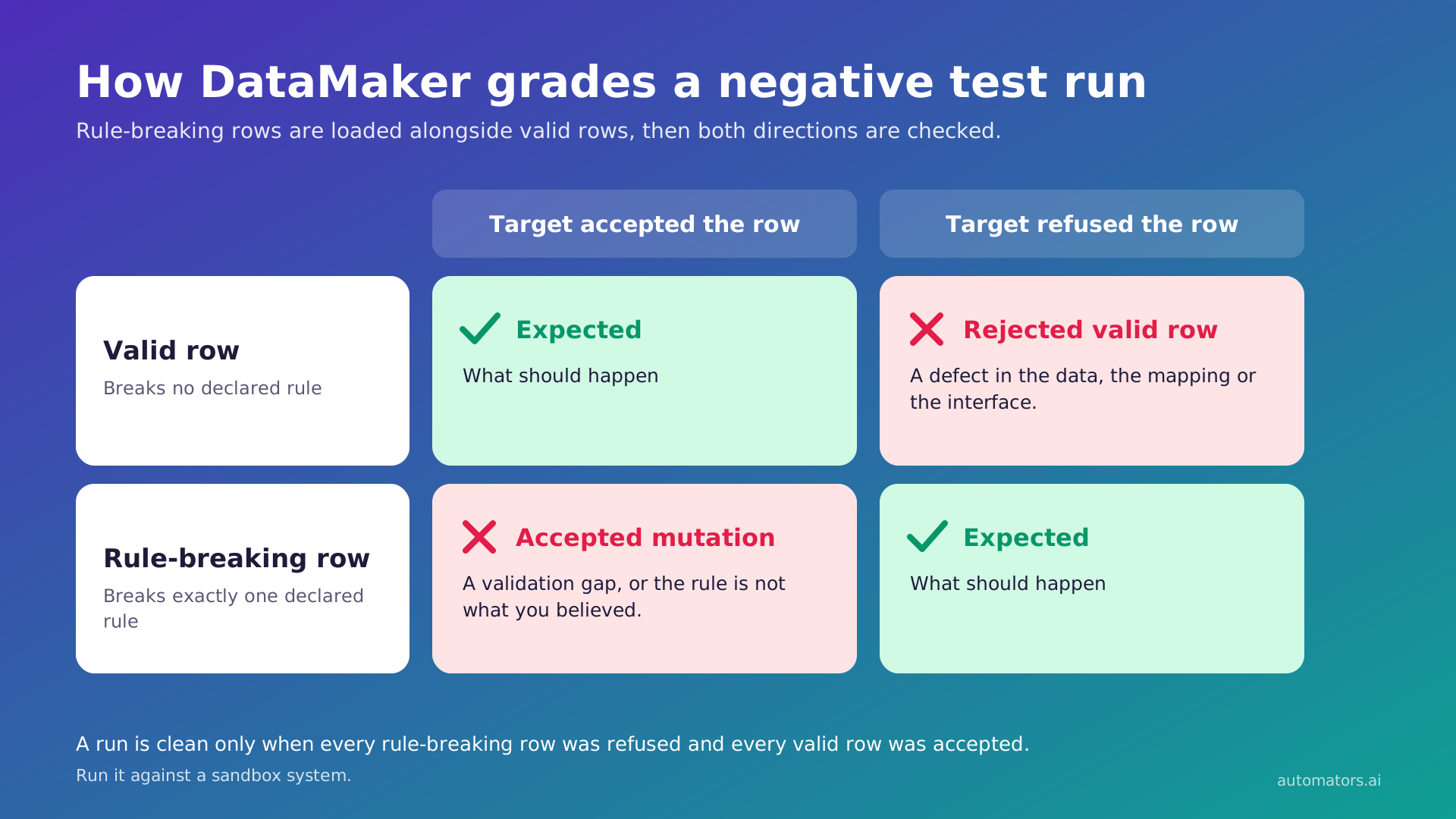
DataMaker can produce test data that production does not contain. No copying tool can, DSM included.
A copy can only contain what the source contains. That puts three kinds of test data out of reach of any copying tool, however good. The first is configuration that goes live next quarter. The second is a regulatory case the business has not hit yet. The third is records your validation is supposed to reject, because production only holds records that passed validation.
DataMaker builds the third kind on purpose. Negative testing produces rows that each break exactly one declared constraint, loads them, then grades the result both ways. A row the target accepted despite breaking a constraint points to a validation gap, or to a constraint that is not what you believed.
A valid row the target refused points to a defect in the data, the mapping or the interface. One violation per row is the rule, because a row with two defects cannot show which one caused the rejection.
Run this against a sandbox. A target that accepts these rows now holds data you did not want it to have. Keep the quarantine restricted, because it holds mutated data and refused valid rows.
8. Control before writing, and evidence after
DSM controls access through SAP's own authorisations. DataMaker controls writes through an approved plan, then grades what landed.
DSM's controls follow SAP's own. EPI-USE says Object Sync respects SAP roles and authorisations. Object Sync templates can lock which scrambling rules every sync uses, and EPI-USE presents this as an audit and governance control. Client Sync sends automated status updates on each sync.
DataMaker's control is the plan. A generation run writes rows only into the endpoints its approved plan names. Before each endpoint write, the endpoint is checked against the plan's entities, anything unnamed is refused, and the refusal is recorded on the audit trail. The check fails closed.
A plan that names no endpoint authorises none, and one that will not parse authorises none. This applies inside a plan run only. Ordinary chat sessions and Python scenarios are not covered.
After the run, DataMaker grades each entity against the approved volume, at exact tolerance. Entities that could not be counted are reported as uncounted, not as lost. Every endpoint write records what was attempted and what succeeded, plus the row count, status and any error.
Acceptance produces a hash-stamped artifact, and a short run can be accepted with a stated reason. Be precise about what that artifact proves: it records a decision, not that the rows arrived.
9. Who operates it
DSM is run by Basis and functional SAP users. DataMaker is run by QA and test engineering.
DSM splits the work by component. Per the FAQ, Basis selects the slice for Client Sync and the tool keeps the client consistent, so no functional knowledge is needed there. Object Sync is aimed at business analysts, functional teams and power users who want data without waiting on Basis. Gartner reviewers mention ease of use and how familiar the interface feels to SAP users.
DataMaker sits with QA and test engineering. A template is a list of fields, and the agent can build one from an endpoint's metadata. That puts the work with the people who know what the test needs, and it asks them to describe the data rather than select it.
10. What it costs
Neither vendor publishes a price list. DSM costs a modular licence, and DataMaker a subscription plus the effort of describing your data. Get a quote from both.
Per Gartner's product summary, DSM is licensed by module, with custom quotes. EPI-USE positions part of the return as infrastructure savings, claiming leaner test clients can cut S/4HANA hardware costs by up to 80%. That is a vendor figure. Test it against your own landscape with the readiness assessment EPI-USE offers.
DataMaker costs a subscription, which we quote rather than publish, so ask us for a figure. There is nothing to install in the SAP landscape.
The effort sits in different places, too, and it belongs in any cost comparison. DSM arrives with its SAP object definitions already built, so setup is mostly choosing slices, objects and masking rules. DataMaker arrives knowing nothing about your data model.
The effort goes into describing the records you need, and templates need revisiting when an endpoint's structure or validation rules change.
The ten areas side by side
| Area | EPI-USE Data Sync Manager | DataMaker |
| What it produces | Copies of existing SAP data, sliced, selected and masked | Records generated from templates, plus masking of existing data |
| Install and run | Works within SAP ABAP landscapes, source to target, SAP-certified for RISE | Hosted, self-hosted or desktop, reaching SAP through OData or REST endpoints |
| Systems reached | SAP ABAP systems in depth, SuccessFactors Employee Central through OData, non-SAP masking through APIs or services | Any system with a REST or OData endpoint or a supported database connection |
| Specific records on demand | Object Sync, down to a single object, written through BAPIs, with an API | A saved template re-run with a new quantity |
| Client and landscape refresh | Client Sync time and company code slices, no BDLS, plus shell creation | Not built for it: 100,000 input rows standard |
| Privacy and masking | Data Secure with prebuilt SAP integrity maps and transformation functions, masking before data leaves production | No production origin when generating, five-strategy masking policies when preparing |
| Data production lacks | Out of reach for any copy | Generated directly, including one-violation-per-row negative sets |
| Control and evidence | SAP authorisations, locked scrambling templates, sync status updates | Plan-named endpoints only, fails closed, per-entity grading, hash-stamped acceptance |
| Who operates it | Basis for client copies, functional users for object copies | QA and test engineering, agent-assisted template building |
| Cost | Modular licence, custom quote | Subscription, quoted |
Choosing by situation
Rebuilding or refreshing test clients from production
DSM. Client Sync and Shell Sync were built for this, and DataMaker's row ceiling makes it the wrong instrument.
Masking real SAP data across a landscape
DSM, on the strength of Data Secure's prebuilt SAP mappings. DataMaker's masking policies work on prepared datasets, but they do not come with an SAP-wide map of where each data type lives.
Reproducing a production issue in QA
DSM. Object Sync copies the exact records involved, and the issue is in those records, not in records like them.
Testing HCM and payroll
DSM. Object Sync copies complex HCM cluster data such as CATS and payroll results. DSM for HCM extends that to SuccessFactors Employee Central and Employee Central Payroll. Payroll outcomes depend on years of accumulated results and the rules applied to them, which a copy carries and a template would have to rebuild.
Testing a scenario production has never seen
DataMaker. A copying tool has nothing to copy.
Knowing what your interfaces reject
DataMaker, per area 7.
Policy forbids production data in non-production, masked or not
DataMaker, if the policy is about where data came from. A copy, however well masked, still came from production. Read the policy first, though. Some are written about the values themselves, and generation carries no guarantee that a generated value will never match a real one.
One process spanning SAP and non-SAP systems
DataMaker, because it reaches anything with an endpoint and treats SAP as one target among several. DSM is specialised for SAP on-premise and SAP's cloud HR, and Data Secure extends its masking to non-SAP systems.
Your Basis team already runs DSM and it works
Keep it, and read the next section.
Running both for different test data needs
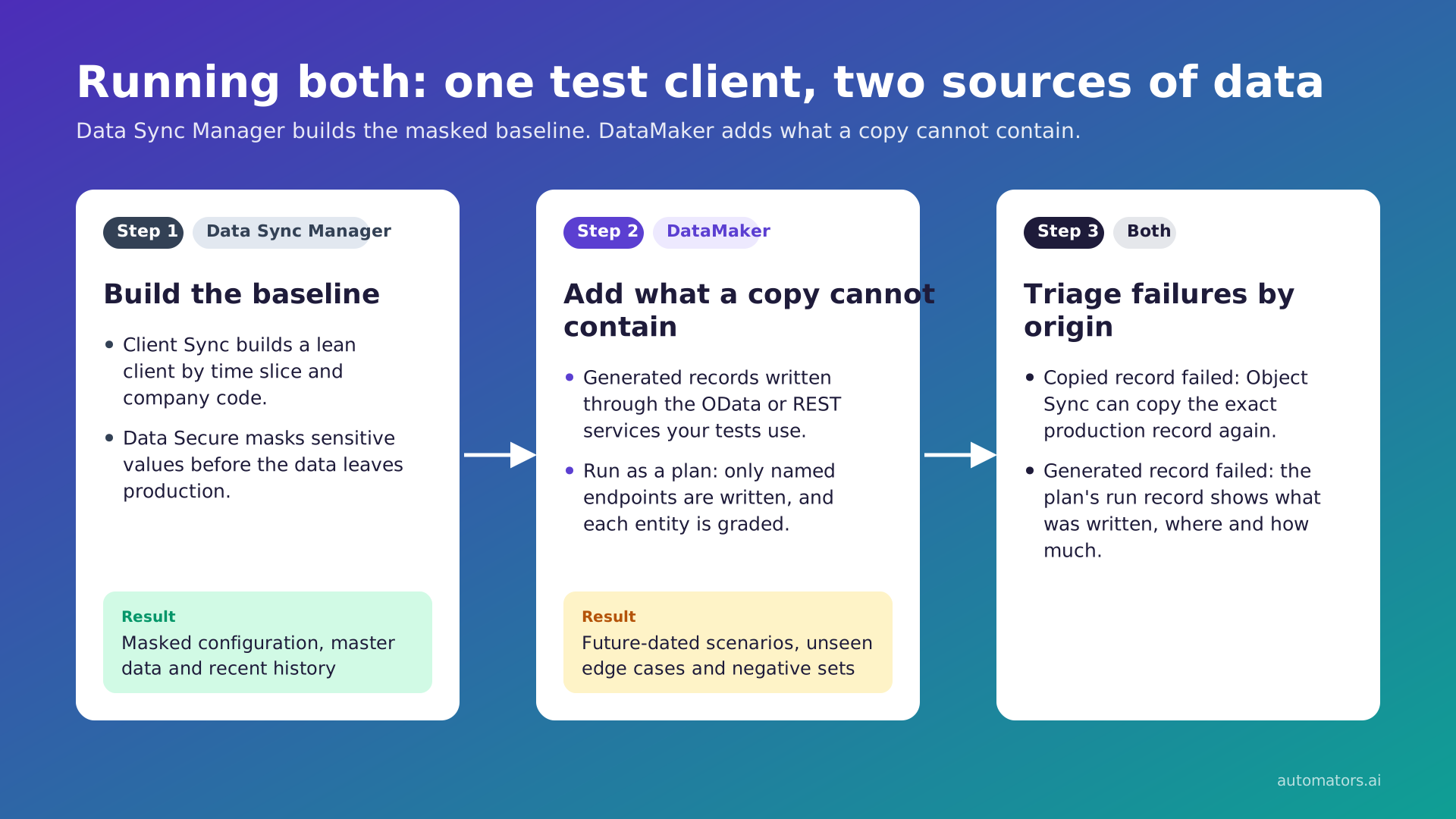
The two tools rarely compete for the same job. In practice, combining them runs in three steps.
Step 1: build the baseline from production
Client Sync builds a lean client by time slice and company code, or Shell Sync realigns an existing system first. Data Secure masks sensitive values before the data leaves production. The test system now holds production's configuration, master data and recent history, masked.
Step 2: add what the copy cannot contain
DataMaker writes generated records into that baseline through the same OData or REST services your tests use. That means future-dated scenarios, edge cases the business has not hit, and negative sets built to be rejected. Run it as a plan, so writes are limited to the endpoints the plan names and each entity is graded against the approved volume.
Step 3: triage what fails
When a test fails on copied data, Object Sync can bring the exact production record across again. When it fails on generated data, the plan's run record shows what was written, where and how much. The two kinds of failure point at different causes, so keeping them distinguishable is worth the discipline.
That is the deliberate framing. DataMaker is not a full end-to-end SAP test platform on its own and does not try to be. It sits alongside the tooling you already run.
If you want to try the generation side
Start with one SAP sandbox, one entity and the OData service your Basis team already exposes. That is small enough to judge in an afternoon. Ask us about a pilot.
Sources
- Data Sync Manager suite, EPI-USE Labs, for suite scope and RISE certification
- Object Sync, EPI-USE Labs
- Client Sync, EPI-USE Labs
- Data Secure, EPI-USE Labs
- Data Locate, EPI-USE Labs, and its beta testing invitation
- Data Sync Manager for HCM, EPI-USE Labs, for Employee Central, Employee Central Payroll and SAP Note 2167337
- System Builder and Shell Sync, EPI-USE Labs
- Data Sync Manager FAQs, EPI-USE Labs, for BAPI insertion, the Object Sync API, integrity maps, transformation functions, BDLS, time-slice limits and operator roles
- Data Sync Manager reviews, Gartner Peer Insights, for licensing model and reviewer comments
- DataMaker behaviour: product documentation at docs.automators.com/datamaker