In simple terms, SAP test data management is the practice of creating high-quality test data on demand and delivering it to the right testing environment without breaking dependencies, workflows, or test cycles.
When you break it down, SAP test data management has two core parts:
- Test data creation
- The management of that data across environments and test cycles
Based on our experience working with complex SAP testing programs, SAP QA teams struggle not because they lack test cases or automation tools, but because they lack reliable, reusable test data.
Without high-quality data, managing it later is not possible.
That is why in this guide, we focus first on the most common and practical methods of creating SAP test data.
We then walk through the lifecycle of managing that data across SAP environments, covering provisioning, refresh strategies, consumption, collaboration, and CI/CD integration.
Along the way, we also review tools and best practices, so this single guide provides a solid foundation in SAP test data management.
The Foundation: Getting the Right Test Data On Demand
Good test data management starts with creation. If you do not create high-quality, dependency-correct data, no amount of “management” will fix the problems later.
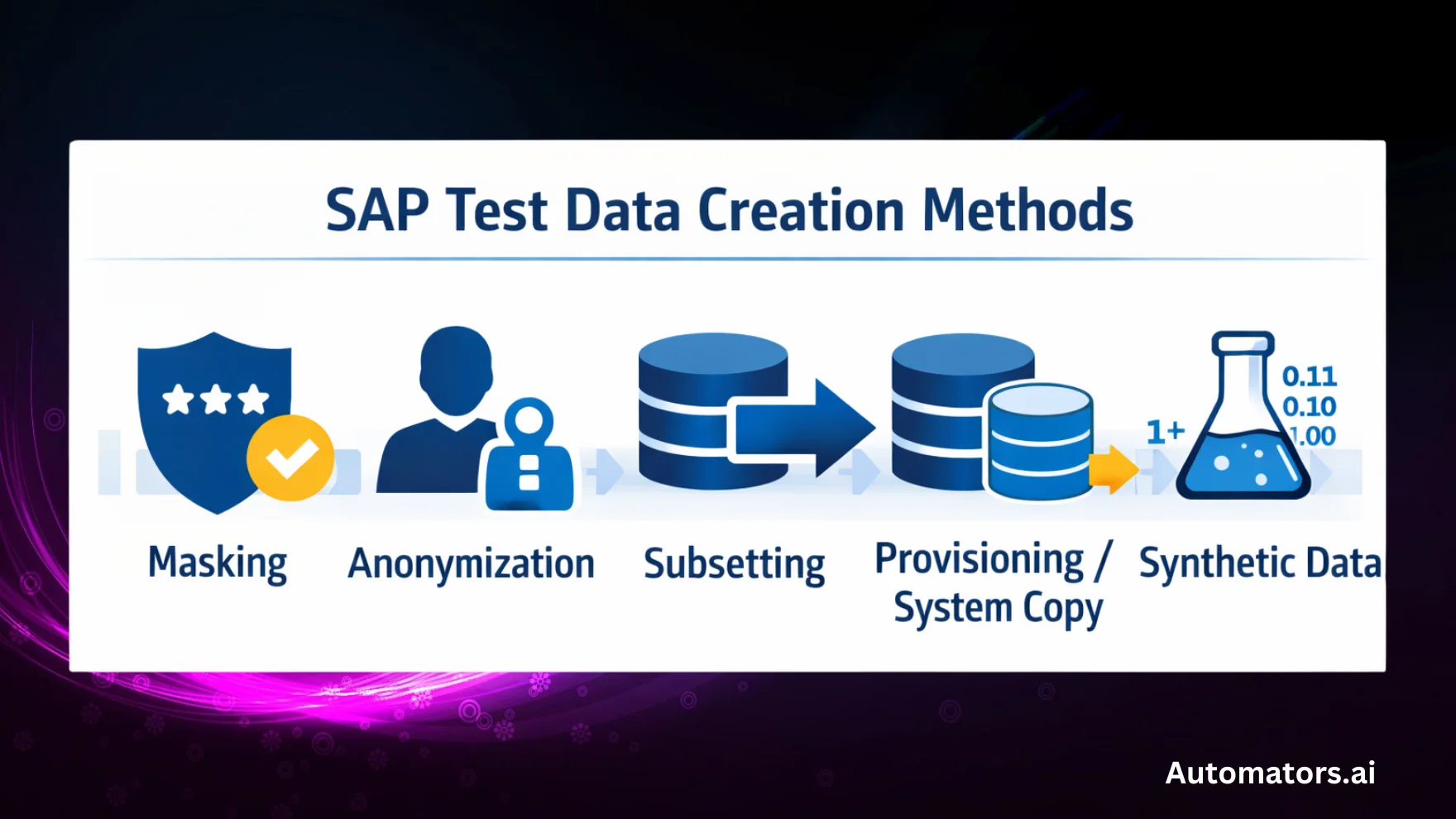
Below are five primary methods used to create test data in SAP testing. Each method has its own strengths and limitations, and each serves different testing needs.
1. Data masking
Data masking is the practice of transforming sensitive production data into fictitious but structurally valid values while preserving SAP’s relational integrity and business behavior.
In practice, masking works through predefined rules that replace real values with realistic but non-sensitive ones.
For example, a real customer email like john.doe@company.com may be replaced with customer_123@testmail.com, while names, addresses, bank details, and identifiers are altered in a consistent way across all related tables.
The goal is to protect sensitive information without breaking data relationships or application logic.
Common SAP masking approaches include SAP Test Data Migration Server (TDMS), EPI-USE Data Sync Manager (DSM), and Custom ABAP-based masking rules.
Where masking fits best
- User acceptance testing (UAT)
- Business simulations and end-user training
- High-fidelity regression testing
Where masking struggles
- It cannot create new or missing test scenarios
- It inherits data quality issues from production
- It does not generate edge cases
- Business patterns remain, increasing the risk of indirect re-identification
2 Anonymization
Anonymization is the practice of permanently removing or irreversibly altering sensitive information so that individuals can no longer be identified, even indirectly.
Unlike masking, anonymization does not allow data to be restored or re-identified. For example, customer names, emails, or identifiers may be replaced with randomized or aggregated values that have no traceable link to the original data.
This makes anonymized datasets suitable for strict privacy and regulatory requirements.
Common anonymization approaches include SAP HANA anonymization and data privacy features, and Privacy controls applied within SAP analytics and reporting platforms.
Where anonymization fits best
- Analytics and reporting environments
- Long-term data storage
- Cross-company or third-party data sharing
Where anonymization struggles
- Not suitable for functional or integration testing
- Can break business logic and relationships
- Limited usefulness for automation or regression testing
3 Subsetting
Subsetting is the practice of extracting a smaller, representative portion of production data while preserving SAP’s relational dependencies.
Instead of copying an entire system, subsetting selects data based on criteria such as company code, plant, region, or time range.
For example, only sales orders for a specific sales organization may be extracted, along with all dependent master and transactional data. This reduces system size while maintaining functional integrity.
Common SAP subsetting tools include EPI-USE Data Sync Manager (DSM), Qlik Gold Client, and K2View.
Where subsetting fits best
- Reducing the size of QA and test environments
- Region- or business-unit-specific testing
- Faster refresh cycles compared to full system copies
Where subsetting struggles
- Cannot generate missing or rare scenarios
- Complex cross-module dependencies increase risk
- Still dependent on production data quality
4 Provisioning / System Copy
Provisioning is the practice of replicating data from one SAP system to another, typically through a full or partial system copy. It does not create new test data, but establishes a baseline dataset for testing.
In SAP programs, provisioning is commonly used to refresh QA, pre-production, or training environments with production-like data.
Because it includes real transactional and master data, it provides high fidelity for testing, but also introduces sensitive information that must be addressed through masking or anonymization.
Common provisioning approaches include SAP system copy (homogeneous or heterogeneous) and Basis-managed landscape refresh processes.
Where provisioning fits best
- High-fidelity user acceptance testing (UAT)
- Pre-production validation
- End-to-end regression testing
Where provisioning struggles
- Includes sensitive production data by default
- Slow, infrastructure-heavy, and costly
- Disrupts ongoing test cycles
- Not suitable for CI/CD pipelines
5 Synthetic Data Generation
Synthetic data generation is the practice of creating entirely new test data from scratch using predefined rules, models, and relationships, without relying on production data.
In SAP testing, synthetic data tools generate master and transactional data that aligns with SAP’s dependency structure.
Customers, materials, pricing, stock, and financial postings can be generated consistently without exposing any personal or confidential information.
Common synthetic data approaches include Rule-based synthetic data generators and API-driven SAP test data tools like DataMaker.
Where synthetic data fits best
- Test automation and CI/CD pipelines
- Repeated test execution with stable inputs
- Edge cases and rare business scenarios
- Environments where production data cannot be used
Where synthetic data struggles
- Requires accurate business rules and modeling
- Complex FI/CO scenarios need domain expertise
- Not always a replacement for masked production data in UAT
Comparison Table: SAP Test Data Creation Methods
| Method | Uses Production Data | Creates New Scenarios | Preserves Relationships | CI/CD Friendly | Best Used For |
| Masking | Yes | No | Yes | Low | UAT, training |
| Anonymization | Yes | No | Partial | Low | Analytics, data sharing |
| Subsetting | Yes | No | Yes | Medium | Smaller QA systems |
| Provisioning | Yes | No | Yes | Very Low | High-fidelity UAT |
| Synthetic | No | Yes | Yes (modeled) | High | Automation, CI/CD |
Alright, so by now, we believe you understand the basics of different test data creation methods. Now, let's discuss the management cycles of the test data.
SAP Test Data Management Lifecycle (From Creation to Deployment)
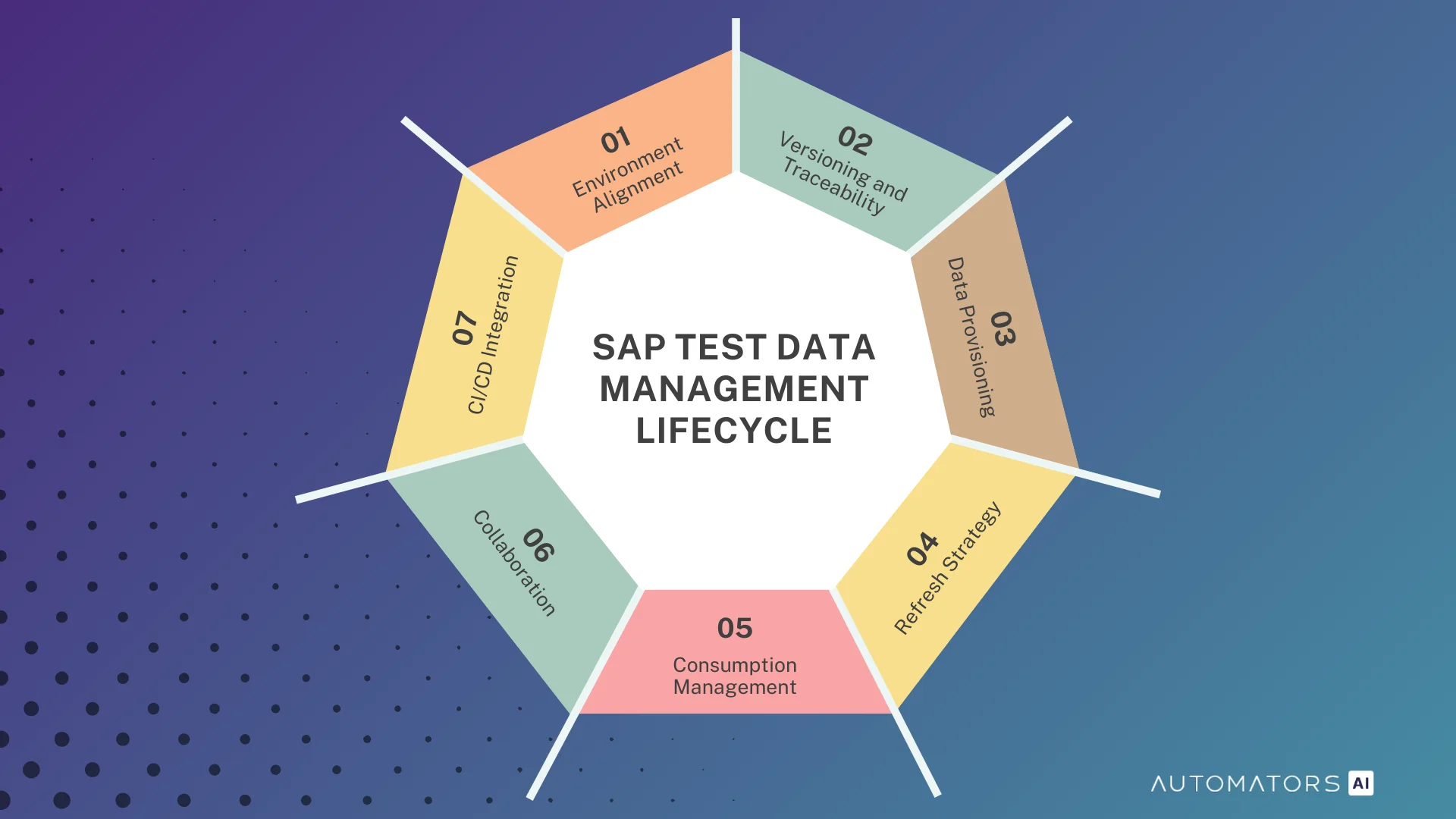
Regardless of how SAP test data is created, whether through masking, subsetting, provisioning, or synthetic generation, all test data follows the same lifecycle once it exists inside the landscape.
This lifecycle determines whether test data remains usable, stable, and repeatable across environments and test cycles.
The stages below describe how SAP teams manage test data in real programs, from the moment it enters the system until it is consumed by testing and automation.
1. Environment Alignment
Environment alignment ensures that SAP systems share compatible configuration and technical settings so that test data behaves consistently across environments.
Every dataset assumes a specific configuration state. If customizing, transports, or integrations differ between systems, even perfectly valid test data will fail during execution. This is why environment alignment must happen before any data is provisioned or generated.
In practice, environment alignment is a coordination exercise. Functional teams, Basis teams, and integration owners must agree on a stable baseline where configuration is frozen for the duration of a test cycle. Without this discipline, data issues are misdiagnosed later as test failures or automation defects.
Common problems at this stage
- Configuration changes transported mid-cycle
- Test data loaded before transports are complete
- Assuming system copies guarantee alignment
What strong teams focus on
- Treating alignment as a prerequisite, not cleanup
- Verifying configuration before data delivery
- Locking environments during critical phases
2. Versioning and Traceability
Versioning and traceability ensure that teams can identify which test data exists, how it was created, where it is deployed, and which test cycles depend on it.
SAP test data changes constantly. It is refreshed, masked, regenerated, and consumed across cycles. Without traceability, teams lose the ability to reproduce defects or explain inconsistent test results. This leads to repeated data recreation instead of root-cause analysis.
In mature SAP programs, test data is treated as a versioned asset. Each dataset is associated with a release, test cycle, or scenario, and its creation method and refresh history are known.
This does not require heavy tooling, but it does require discipline.
Where teams usually fail
- Recreating data without recording changes
- Overwriting data during refreshes
- Automation running without data identification
What enables stability
- Clear dataset ownership
- Consistent naming and labeling
- Linking data versions to tests and defects
3. Data Provisioning
Data provisioning is the process of delivering test data into the correct SAP environments so it can be used for testing.
Provisioning is often misunderstood as a technical task, but in SAP it is a timing and coordination problem. Data must arrive in the right environment, in the right version, at the right moment, without disrupting active test cycles.
Different creation methods require different provisioning approaches. System copies establish baselines, masked or subset data is applied during controlled refreshes, and synthetic data is often injected through automated mechanisms. Regardless of method, provisioning must be repeatable and predictable.
Typical provisioning failures
- Loading data into unstable environments
- Overwriting active test cycles
- Deploying outdated or wrong data versions
What experienced teams do
- Provision only after alignment and versioning
- Communicate provisioning windows clearly
- Validate data immediately after delivery
4. Refresh Strategy
Refresh strategy defines how and when SAP test environments are reset to maintain data reliability.
SAP test data is stateful and degrades over time. Transactions consume inventory, change statuses, and alter balances. Without a refresh strategy, environments slowly become unusable and failures become harder to diagnose.
Effective SAP teams define refresh strategies per environment, not per landscape. Training, QA, automation, and pre-production systems all have different refresh needs. The refresh approach must also align with how data is created and consumed.
Where refresh strategies break
- One refresh schedule for all environments
- Reactive refreshes after failures
- Skipping validation after refresh
What works in practice
- Environment-specific refresh policies
- Planned refresh windows aligned to releases
- Regeneration instead of full resets where possible
5. Consumption Management
Consumption management controls how test data is used and depleted so tests can be repeated reliably.
In SAP, test data is not static. Every execution changes system state. If consumption is not managed, tests fail on repeat runs even when nothing is technically broken.
Strong teams design test data with consumption in mind. Baseline data is separated from transactional data, and regeneration or reset mechanisms are planned upfront. This is especially critical for automation.
Common breakdowns
- Reusing transactional data across runs
- Assuming data remains unchanged
- Manual data fixes without impact tracking
What stabilizes testing
- Treating transactional data as consumable
- Designing automation to request fresh data
- Aligning consumption with refresh strategy
6. Collaboration
Collaboration ensures that all teams involved in SAP testing work with shared data assumptions and ownership.
Test data is touched by functional consultants, developers, testers, and automation engineers. Without coordination, teams create conflicting datasets and ad-hoc fixes that destabilize environments.
Effective collaboration does not require heavy governance. It requires shared rules, clear ownership, and visibility into how data is created and used across teams.
Where collaboration fails
- Parallel, uncoordinated data changes
- Automation without functional alignment
- No shared source of truth
What enables consistency
- Clear data ownership
- Shared templates and rules
- Cross-team visibility into data changes
7. CI/CD Integration
CI/CD integration ensures that test data supports fast, repeatable, and non-interactive testing.
Pipelines expose weaknesses in test data management immediately. Static data, slow refreshes, and shared state cause flaky tests and reduce trust in automation.
Successful SAP teams treat test data as a first-class pipeline dependency. Data preparation is automated, isolated per run where possible, and validated before execution.
Common CI/CD mistakes
- Reusing UAT-style data
- Sharing data across pipeline runs
- Partial automation of data preparation
What makes pipelines reliable
- Deterministic data per execution
- On-demand regeneration
- Clear separation of data and application failures
Tools That Support SAP Test Data Management
| Tool | Primary Focus | Strengths | Limitations |
| SAP TDMS | Masking, subsetting | Deeply integrated into SAP ECCReliable for traditional masking and subsetting | Directionally deprecatedLimited S/4HANA supportNot designed for automation or CI/CD |
| EPI-USE Data Sync Manager (DSM) | Masking, subsetting | Best-in-class masking and subsettingStable for both ECC and S/4HANA landscapes | No synthetic data generationDependent on production data quality |
| Qlik Gold Client / K2View | Subsetting, provisioning | Fast data subsetting and provisioningUseful for creating smaller test environments | No synthetic data supportRelies on masked production copies |
| Automator's DataMaker | Synthetic data generation | Zero PII riskGenerates SAP-valid datasetsSupports O2C, P2P, H2R, R2R processesAPI-based delivery for CI/CD | Requires accurate business rulesFI/CO scenarios need careful modelingNot always a replacement for masked production data in UAT |
The Automators SAP Test Data Management Framework (7 Steps)
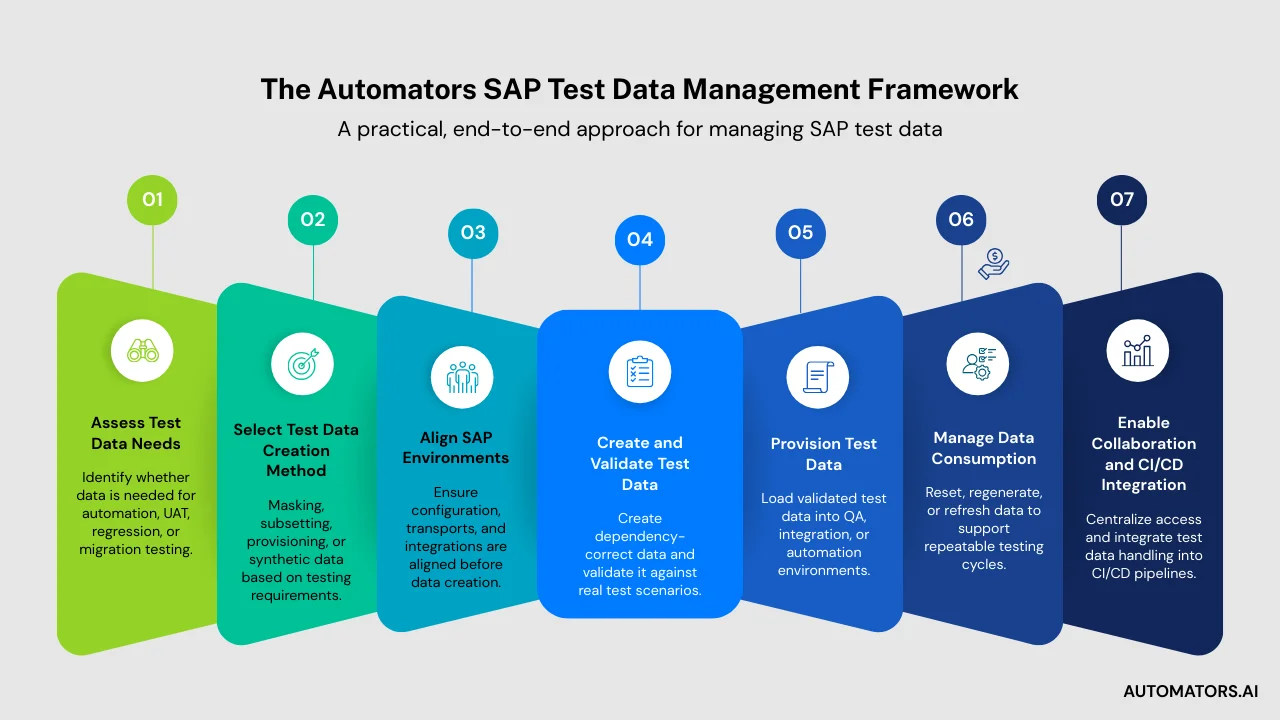
To bring everything together, we use a simple, repeatable framework that can be applied consistently across SAP testing programs.
This framework works equally well for internal planning, client discussions, and documentation, and reflects how effective SAP teams actually manage test data.
Step 1: Assess Test Data Needs
Start by understanding the testing context. Identify whether the primary need is regression testing, test automation, UAT, system migrations, or a combination of these. The purpose of testing determines the type of data required.
Step 2: Select Test Data Creation Method(s)
Choose the most appropriate creation approach based on those needs. This may include masking, subsetting, provisioning through system copies, synthetic data generation, or a combination of methods.
Step 3: Align SAP Environments
Ensure that target environments are configuration-compatible before introducing test data. This includes transport consistency, configuration freezes during test cycles, and alignment of critical master data and integrations.
Step 4: Create and Validate Test Data
Generate, mask, subset, or synthesize the required data, then validate it against the intended test scenarios. Data should be dependency-correct and ready for execution before it is shared with testing teams.
Step 5: Provision Data to Each Environment
Deliver the validated test data to the required SAP systems using the appropriate mechanism, whether through TDMS, DSM, system copies, or API-based delivery for synthetic data.
Step 6: Manage Data Consumption
Control how test data is used and depleted during testing. Depending on the creation method, this may involve resetting state, regenerating fresh data, or refreshing environments to maintain repeatability.
Step 7: Enable Collaboration and CI/CD Integration
Provide centralized access to test data assets, shared templates, and clear ownership. Integrate test data handling into automation pipelines so that data preparation becomes part of continuous testing workflows.
This framework represents Automators’ practical approach to SAP test data management and can be reused as a consistent model across projects and SAP landscapes.
Final Words
SAP test data management is not just a technical process—it is a foundation for quality, automation, and migration success. Whether using masking, subsetting, provisioning, or synthetic generation, the goal remains the same: provide the right data, in the right environment, at the right time.
When SAP teams combine the right creation methods with a clear lifecycle, aligned environments, and modern delivery mechanisms, testing becomes faster, more accurate, and more reliable.
This balanced, end-to-end approach is how modern SAP landscapes achieve efficiency without sacrificing compliance or quality.